Authors

Elliot Gunn
Product Marketing Manager

Elliot Gunn
Product Marketing Manager
dbt Core handles transformation. It doesn’t schedule itself, wait for upstream sources, retry on failure, or alert anyone when something breaks. So you need something around it that does — an orchestrator that knows when source data is ready, triggers the run, and handles what happens when things break.
The choice matters more than it might seem. Kestra’s own analytics stack runs this way: our analytics engineer, Rok, uses Kestra to orchestrate PyAirbyte ingestion, dbt transformations in BigQuery, and Lightdash reporting for the entire company on a single platform. That setup is documented here. What follows is why Kestra is a natural fit for dbt Core teams specifically, and what that looks like in practice.
The two use cases are different, but Kestra adds value in both.
dbt Core ships without a production runtime. No scheduler, no retry logic, no dependency management, no alerting. You need something around it that handles all of that.
Kestra is that layer: it runs your dbt CLI commands in isolated containers, waits for upstream sources before triggering, retries on transient failures, and routes alerts when things break. The rest of this post is about this setup.
dbt Cloud includes its own scheduler and CI runner, so teams whose pipeline starts and ends with dbt can get by without a separate orchestrator. But most pipelines don’t start and end with dbt. They start with ingestion (Airbyte, Fivetran, custom extractors) and feed into activation or analytics layers downstream.
dbt Cloud orchestrates its slice. Everything around it is your problem.
Kestra handles that broader pipeline (ingestion, transformation, activation) as a single workflow. dbt Cloud can still run the transformation layer; Kestra coordinates what happens before and after. The dbt Cloud orchestration page covers that setup in detail.
And for teams that care about cross-stack lineage, Kestra’s Assets fill the gap dbt Cloud leaves: dbt tracks lineage within your models, but has no visibility into the S3 bucket feeding them or the reverse ETL sync consuming their output. Assets tracks inputs and outputs across every step in the pipeline, not just within dbt.
dbt teams already think in YAML. A Kestra workflow uses the same syntax and mental model, so there’s no context switch between defining a dbt model and defining the orchestration around it.
Here’s a dbt schema definition:
# dbt schema.ymlmodels: - name: orders description: cleaned orders columns: - name: order_id tests: - unique - not_nullAnd here’s the Kestra task that runs it:
# kestra workflowid: dbt_pipelinenamespace: company.data
tasks:  - id: build    type: io.kestra.plugin.dbt.cli.DbtCLI    commands:      - dbt build
Python-based orchestrators require a different context entirely: DAG definitions, decorator patterns, framework-specific imports. For a team that lives in YAML and SQL, that’s a real overhead cost.
The topology updates live as you type — no deploy-to-preview cycle. You can see the DAG take shape before the workflow ever runs.
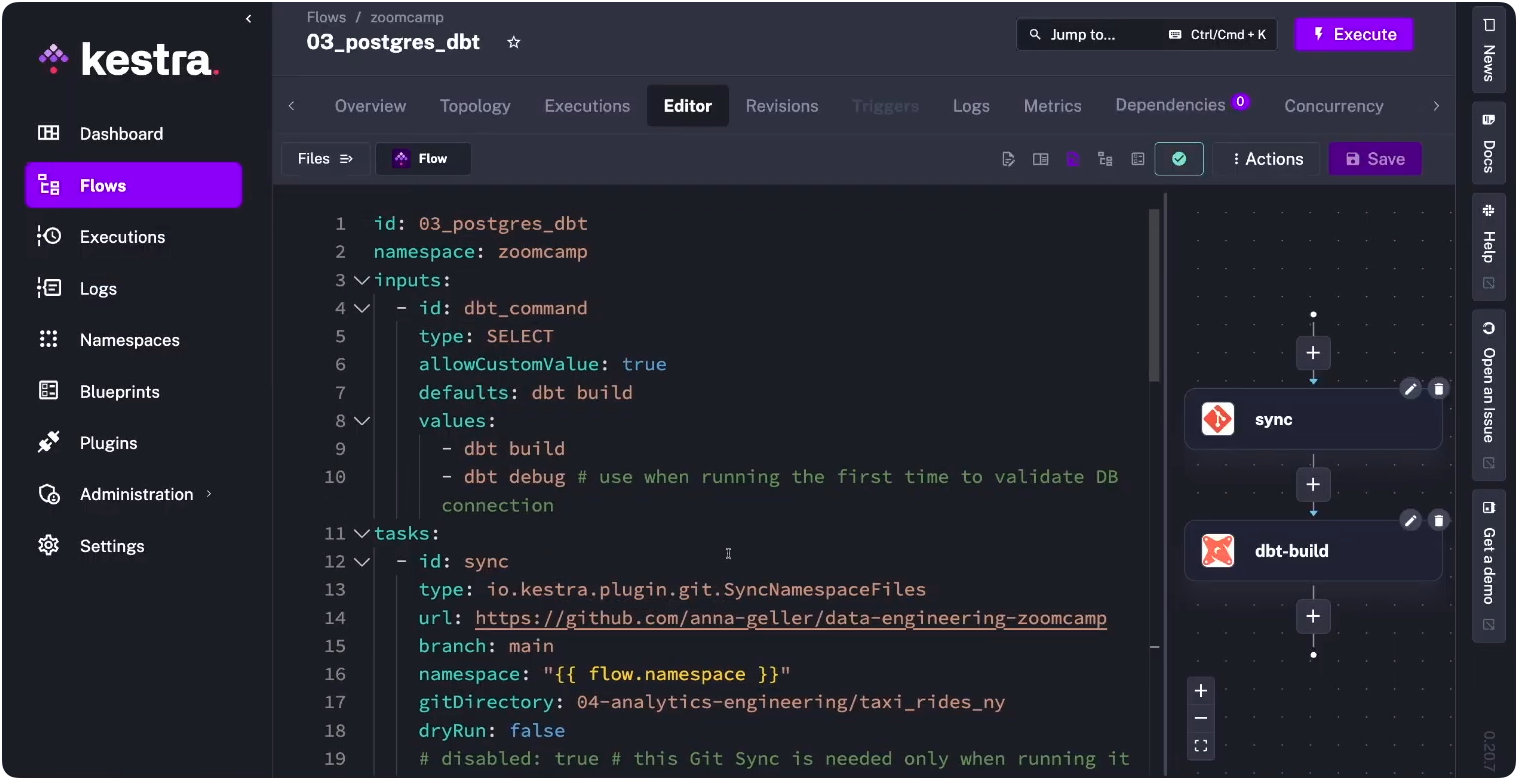
Kestra’s dbt plugin runs CLI commands (dbt build, dbt test, dbt deps) inside isolated Docker containers. Point it at your existing repo and it runs as-is.
dbt rarely runs in isolation. Ingestion and activation sit on either side of it, and Kestra handles those with 1200+ plugins. dbt becomes one step in a larger workflow rather than an isolated process you glue to other tools with scripts.
For teams that care about cross-pipeline lineage, Kestra’s Assets feature tracks inputs and outputs across every step, not just within dbt. You can see which warehouse tables a dbt model reads from, what downstream workflows consume its output, and which execution created or last modified a given asset, across your entire stack from ingestion through activation.
Retries with exponential backoff, error handling blocks, secrets management, RBAC, audit logs — Kestra treats these as first-class workflow components, declared in the same YAML file as your dbt tasks rather than bolted on through separate tooling.
Kestra can trigger dbt runs on a cron schedule, but also in response to file arrivals in S3, webhook calls, Kafka messages, or the completion of an upstream task. Your dbt models run when the data is actually ready, not on a timer that hopes it is.
Most analytics engineers piece this together over time: a cron job here, a Slack webhook bolted on there, a bash script that sort-of retries.
Kestra’s version is all of it in one YAML file, co-located with the orchestration logic itself. These patterns come from Kestra’s dbt documentation and production Blueprints.
The setup most teams start with: clone from Git, install packages, run dbt build, schedule daily. Kestra handles all of it, and the containerImage field pins the exact dbt version to the workflow — no more “works on my machine” builds or host environment collisions. Credentials stay in Kestra’s secrets manager, not in profiles.yml committed to your repo.
id: dbt_pipelinenamespace: company.data
tasks:  - id: dbt    type: io.kestra.plugin.core.flow.WorkingDirectory    tasks:      - id: clone        type: io.kestra.plugin.git.Clone        url: https://github.com/your-org/dbt-project        branch: main      - id: build        type: io.kestra.plugin.dbt.cli.DbtCLI        containerImage: ghcr.io/kestra-io/dbt-duckdb:latest        commands:          - dbt deps          - dbt build        profiles: |          my_project:            outputs:              prod:                type: snowflake                account: "{{ secret('SNOWFLAKE_ACCOUNT') }}"                user: "{{ secret('SNOWFLAKE_USER') }}"                password: "{{ secret('SNOWFLAKE_PASSWORD') }}"                database: analytics                schema: public            target: prod
triggers: - id: daily type: io.kestra.plugin.core.trigger.Schedule cron: "0 8 * * *"Credentials live in Kestra’s secrets manager, not in your repo. The containerImage field controls which dbt version runs, isolated from anything else on the host.
The classic analytics engineer workaround: schedule dbt at 8am, Fivetran finishes at 8
, so you push the cron to 9am and add a buffer. The buffer gets stale, models run on yesterday’s data, and nobody notices until a dashboard looks wrong.The real fix is declaring the dependency explicitly. Kestra sequences tasks: the Airbyte sync runs first, dbt starts only after it completes.
tasks:  - id: airbyte_sync    type: io.kestra.plugin.airbyte.connections.Sync    connectionId: "{{ secret('AIRBYTE_CONNECTION_ID') }}"
  - id: dbt_build    type: io.kestra.plugin.dbt.cli.DbtCLI    containerImage: ghcr.io/kestra-io/dbt-duckdb:latest    commands:      - dbt build
Tasks run sequentially by default. If the sync fails, dbt never starts. Multiple independent sources can run in parallel, with dbt gated on all of them completing.
Every execution gets a Gantt view showing task timing, plus real-time container logs — so when something does fail, you’re looking at exactly what ran, in what order, and where it stopped.
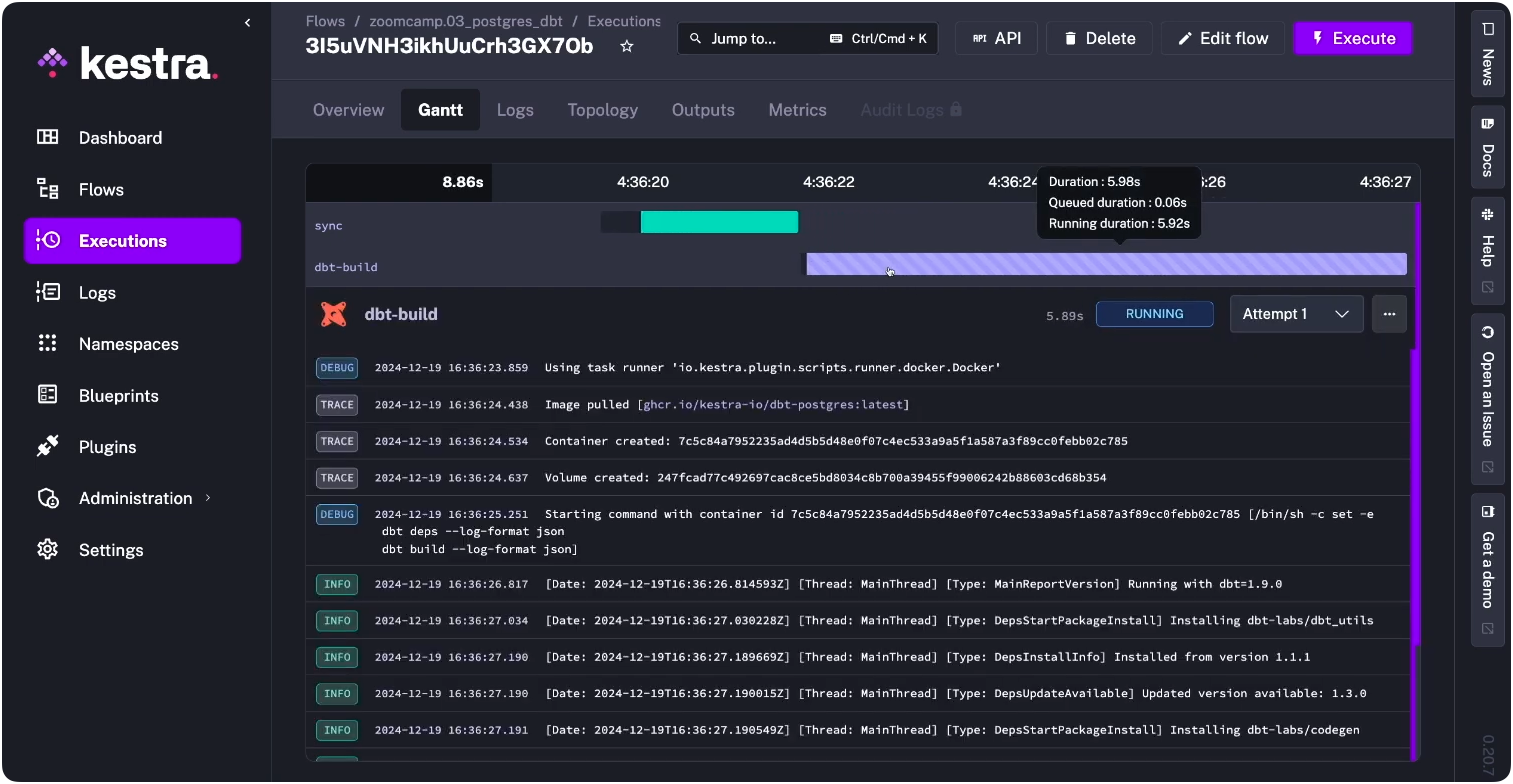
Warehouse timeouts, Snowflake query failures, and transient network errors are a fact of life in production. Without retry logic, a 30-second blip pages someone at 8am or silently breaks a dashboard. With it, most transient failures resolve themselves before anyone notices.
- id: dbt_build type: io.kestra.plugin.dbt.cli.DbtCLI retry: type: exponential maxAttempts: 3 interval: PT30S maxInterval: PT5M commands: - dbt buildThree attempts with exponential backoff. The retry is declared alongside the task, not in a separate config file or monitoring layer.
When retries are exhausted, you want to know immediately — not when a stakeholder messages asking why a number looks off. The errors block runs only on workflow failure and routes to wherever your team actually responds: Slack, email, PagerDuty, or anything with an API.
errors: - id: slack_alert type: io.kestra.plugin.slack.notifications.SlackIncomingWebhook url: "{{ secret('SLACK_WEBHOOK') }}" messageText: | dbt build failed in {{ flow.namespace }} Execution: {{ execution.id }}The message includes the execution ID, so whoever responds can jump directly to the logs instead of hunting through run history.
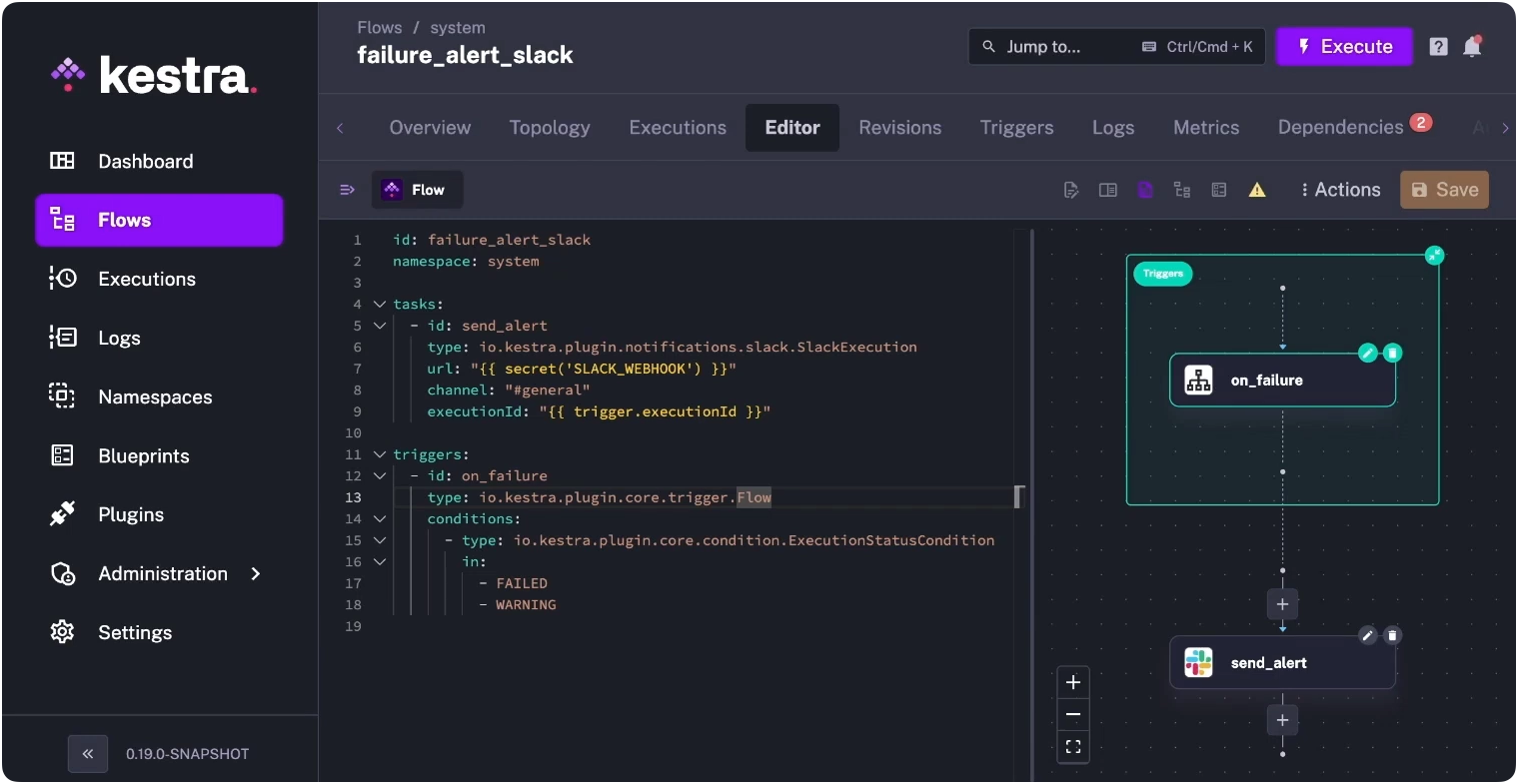
You can also set this up as a standalone system flow in Kestra — a single failure_alert_slack flow that watches for FAILED or WARNING status across your entire namespace and routes to Slack automatically, separate from any individual pipeline.
For teams with a mature dbt workflow, Git sync keeps Kestra’s namespace files in sync with your repo automatically. Each run pulls the latest code — no manual clone step, no drift between what’s in Git and what’s running in production.
tasks:  - id: sync    type: io.kestra.plugin.git.SyncNamespaceFiles    url: https://github.com/your-org/dbt-project    branch: main    namespace: "{{ flow.namespace }}"    gitDirectory: dbt
  - id: dbt_build    type: io.kestra.plugin.dbt.cli.DbtCLI    containerImage: ghcr.io/kestra-io/dbt-duckdb:latest    namespaceFiles:      enabled: true    commands:      - dbt deps      - dbt build
The CI side of this is where it gets useful for larger teams: run dbt build --select state:modified+ against a feature branch and block merges on test failures. Kestra persists the dbt manifest between runs, so state-based selection actually works — you’re not rebuilding the full project on every PR.
The choice of orchestrator shapes more than deployment mechanics. It shapes whether your data team can reason about the full pipeline in one place, whether engineers outside the dbt project can understand what’s running and when, and whether failure surfaces quickly or silently.
dbt Core handles transformation precisely. What wraps around it determines everything else. The fastest path to seeing this in practice is a dbt Blueprint: a production-ready template you can deploy and modify. For profiles management, manifest caching, and multi-environment setups, our dbt orchestration docs cover the full picture.
Running dbt across multiple teams with namespace isolation, RBAC, and audit logging? Book a demo to see those features in action.

Stay up to date with the latest features and changes to Kestra