Authors

Rok Grabnar
Analytics Engineer
Rok Grabnar
Analytics Engineer
As Kestra’s only analytics engineer, I run a production-grade ELT stack end-to-end. I rely on PyAirbyte and custom dltHub sources to ingest data from platforms like PostHog, HubSpot, and Pylon into BigQuery, transform it with dbt, and visualize it in Lightdash. This streamlined pipeline enables me to support sales, marketing, product, and leadership teams from a single, cohesive system.
This works because Kestra treats my Python scripts, SQL transformations, and bash utilities as first-class citizens—no refactoring required. Unlike other orchestrators, which expect code to conform to their framework patterns, Kestra orchestrates my existing tooling exactly as written. For enterprises, this means migrating workflows doesn’t require rewriting your codebase or training teams on new abstractions.
When the orchestration layer stays out of the way, I get to spend my time doing the work analytics engineers actually want to do: understanding the business, answering internal questions, and building things my colleagues actually use.
Here’s what Kestra’s data infrastructure actually looks like:
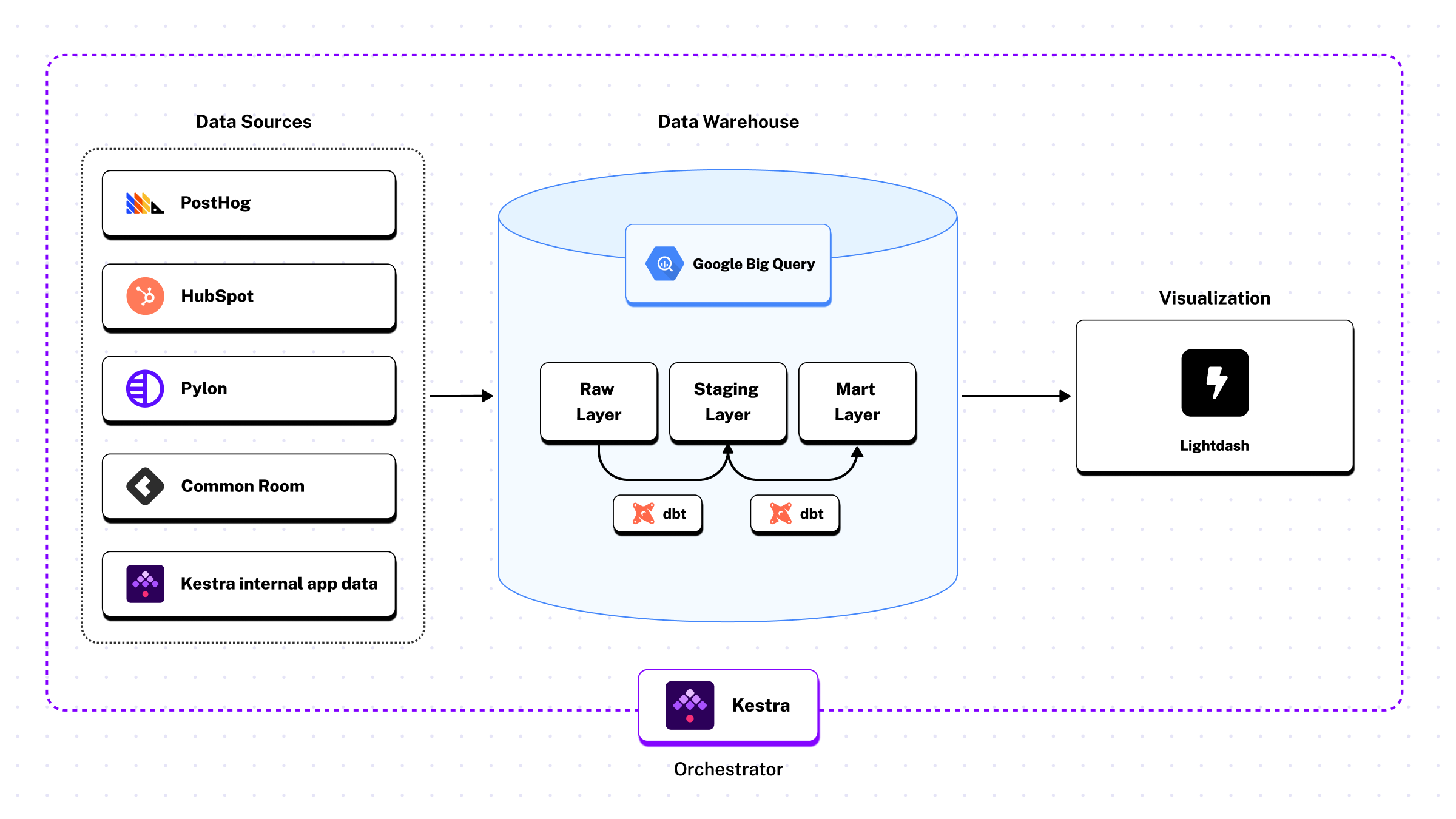
Sources:
Ingestion:
Warehouse:
Transformation:
Visualization:
Orchestration:
In Kestra, workflows are defined declaratively in YAML and execution happens in Docker containers. (New to YAML? We have an introductory blog post here. Orchestration logic is kept separate from application code by design. That separation makes it easier to orchestrate data pipelines that span multiple languages and tools.
This is important for enterprise environments, because data pipelines routinely coordinate SQL transformations, Python-based ingestion, and language-specific services that teams rely on for different parts of the stack.
In our case, this shows up directly in how the analytics stack is wired together. dbt models, containerized ingestion jobs, and downstream checks are coordinated by the same orchestration layer, without forcing those components into a single programming model. The result is simpler pipelines and reusable building blocks.
In Kestra, a single flow can:
All of these happen without rewriting existing code or translating it into a single framework. Each component runs in the form it was designed to run, using the language and tooling that make sense for that task.
This lets us evolve the stack incrementally. We can introduce a new service, keep a legacy script, or change how a particular step is implemented without turning orchestration into a refactoring project that adds unnecessary work. SQL stays SQL. Python stays Python. Language-specific services remain first-class citizens.
Kestra simply ties these pieces together without introducing additional layers that teams then have to maintain.
When enterprises scale, the number of pipelines grow and the same operational steps repeat everywhere: building containers, wiring credentials, running dbt, handling failures consistently. Duplicating those steps makes changes harder and increases the risk of inconsistencies, so Kestra supports reuse at the workflow level through subflows.
A subflow is a complete workflow that can be invoked by other workflows. This lets us standardize how pipelines run without copying configuration everywhere, so adding or modifying pipelines stays cheap as the stack grows.
In our analytics stack, that shared logic is captured in a utility subflow called pydata. Its job is to handle containerized execution like dbt runs. When I need to run dbt after ingesting data from HubSpot, I call the subflow. When I need to run dbt after ingesting from PostHog, I call the same subflow and can even adjust CPU or memory allocation for each call, since running dbt typically requires fewer resources than ingestion and loading.
# Simplified exampleid: hubspotnamespace: data.sources
tasks:  - id: subflow    type: io.kestra.plugin.core.flow.Subflow    flowId: pydata    namespace: data.utils    inputs:      cmd: "python -m <path-to-python-function-that-extracts-hubspot-data>"    wait: true
triggers:  - id: schedule    type: io.kestra.plugin.core.trigger.Schedule    cron: 0 1 * * *
Individual workflows don’t need to know how containers are built or how dbt is invoked; they just delegate that responsibility to pydata.
The benefit is simplicity. When something changes in how we run dbt or build images, we update it once. Every pipeline stays consistent, readable, and focused on source-specific logic. As the number of pipelines grows, the operational surface area stays small.
This is the kind of reuse analytics engineering actually needs: a way to centralize coordination without spreading infrastructure concerns across every pipeline.
In Kestra, every workflow belongs to a namespace, and that namespace is visible to the orchestrator at runtime.
We use namespaces to reflect ownership and purpose in the analytics stack. Data pipelines live in one namespace, product and internal workflows live in other namespaces.
Because namespaces are part of the orchestration model, we can build alerting once, at the system level. A single monitoring flow watches execution states across all workflows.
When one of our workflows fails or enters a warning state, the monitoring flow inspects the namespace and routes failures to its respective Slack channel. Data pipeline failures go to #data-alerts, and product-related failures go to #product-alerts.
The routing logic is a small set of conditional tasks defined in ~30 lines of YAML:
id: slacknamespace: monitors
tasks:  - id: data    type: io.kestra.plugin.slack.notifications.SlackExecution    url: "{{ render(namespace.slack.webhook) }}"    channel: "#data-alerts"    username: "Kestra Monitor"    iconEmoji: ":alert:"    executionId: "{{ trigger.executionId }}"    runIf: "{{ trigger.namespace | startsWith('data') }}"
  - id: product    type: io.kestra.plugin.slack.notifications.SlackExecution    url: "{{ render(namespace.slack.webhook) }}"    channel: "#product-alerts"    username: "Kestra Monitor"    iconEmoji: ":alert:"    executionId: "{{ trigger.executionId }}"    runIf: "{{ trigger.namespace | startsWith('product') }}"
triggers: - id: listen type: io.kestra.plugin.core.trigger.Flow conditions: - type: io.kestra.plugin.core.condition.ExecutionStatus in: - FAILED - WARNINGAs workflows are added or ownership changes, the alerting model remains stable because it’s driven by namespace, not by individual pipelines.
Kestra also provides ready-to-use Blueprints for common patterns like this, making it easy to implement monitoring, alerting, and other operational workflows without starting from scratch.
All our flows are deployed via Terraform for one simple reason: Kestra’s model maps cleanly onto infrastructure-as-code practices.
Flows, namespaces, schedules, and secrets in Kestra are all declarative and environment-scoped. That makes them a natural fit for being managed alongside the rest of our infrastructure, rather than existing as state hidden in a UI or embedded in application code.
In our setup, workflow definitions live in Git and are promoted from development to production through Terraform. We maintain separation between development and production environments through Terraform state, ensuring changes are tested before they reach production. Terraform owns the deployment lifecycle, while Kestra remains the execution and coordination layer.
For enterprises requiring stronger isolation, Kestra Enterprise provides tenants—fully isolated environments within a single Kestra instance. Each tenant gets its own namespace hierarchy, execution isolation, and access controls. This enables multi-team deployments where different business units can operate independently while sharing the same orchestration infrastructure.
For example, our secrets flow from GCP Secret Manager into Terraform and then into Kestra. There’s no secondary configuration layer or ambiguity about what’s deployed where. Orchestration is treated like infrastructure, using the same patterns we rely on everywhere else.
For a small analytics team (n=1), this matters because it removes operational risk. One person can make changes confidently without accidentally breaking production.
All of this runs on one stack, coordinated by one orchestration layer, without requiring a team of specialists to keep it running.
With this setup, I deliver insights that directly impact how we grow and serve customers:
As many of my fellow analytics engineers know, modern data teams aren’t Python-only. We’re all running a mix of SQL, dbt, shell scripts, Python, and other language-specific tools, often within the same data pipeline and maintained by different people over time.
The job of an orchestrator is to adapt to that complexity. It should coordinate work across a diverse stack, run code reliably, and make failures visible, without forcing everything into a single language or abstraction.
That’s the model Kestra is built around. It’s what enables me to run our entire analytics operation solo. It’s the setup that allows teams to move fast when the business needs answers.
If you’re curious to dig deeper, book a demo to see how Kestra can support your analytics stack.

Stay up to date with the latest features and changes to Kestra