Automate Security Operations Workflows in Kestra
For the complete documentation index, see llms.txt. For a full content snapshot, see llms-full.txt. Append.mdto anykestra.io/docs/*URL for plain Markdown.
Operationalize SecOps benchmarks with Kestra.
This how-to shows how to operationalize SecOps benchmarks with Kestra. You will download a CIS benchmark, store control recommendations as settings, and orchestrate compliance scans and automated remediation across multiple controls and teams.
Prerequisites
- Access to the CIS benchmark for your target operating system (Ubuntu 24.04 LTS in this example)
- A Kestra namespace strategy for SecOps (for example
company.security.cis.linux.ubuntu.22-04-lts.devops) - SSH access (public key) to the target VMs you plan to scan/remediate
- Appropriate secrets configured in Kestra for usernames, private keys, and webhook triggers
Step 1: Download the Benchmark
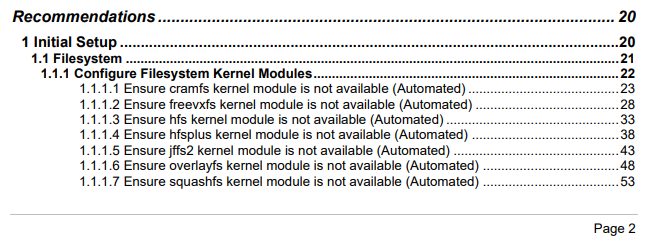
- Go to https://downloads.cisecurity.org/#/ and download the CIS_Ubuntu_Linux_24.04_LTS_Benchmark_v1.0.0 (or the benchmark that matches your OS).
- Review the controls you plan to enforce and note the recommended settings.
Step 2: Define the Namespace and Settings Structure
- Decide how to segment namespaces per team or environment. Examples:
company.security.cis.linux.ubuntu.22-04-lts.devopscompany.security.cis.linux.ubuntu.22-04-lts.dataeng
- Create settings (KV pairs) for every control you want to validate. For instance, controls under section 1.6:

And they can be stored by following this hierarchy:
1├── 1.1│ ├── 1.1.1│ │ ├── 1.1.1.1│ │ └── 1.1.1.2└── 1.6 └── 1.6.4- Use consistent KV naming so any flow can dynamically fetch a control setting. Example naming convention:
control-1-1_6-1_6_4for control 1.6.4. - Store the recommended permission string or configuration snippet for each control. Control 1.6.4, for example, ensures
/etc/motdpermissions follow security guidance.
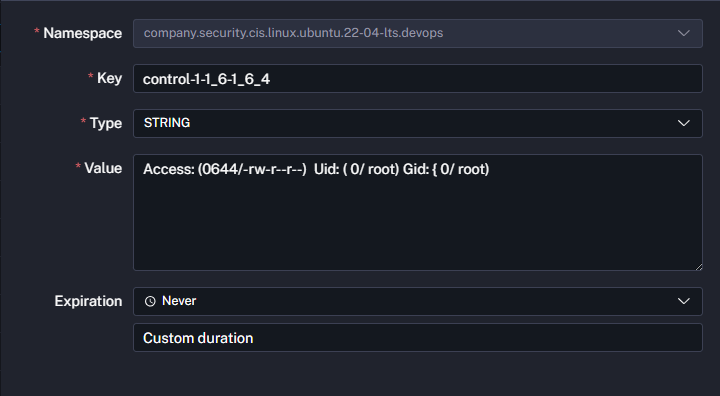
Repeat this process for every control you intend to enforce. The walkthrough below focuses on 1.6.4, 1.6.5, and 1.6.6.
Step 3: Store Secrets for VM Access
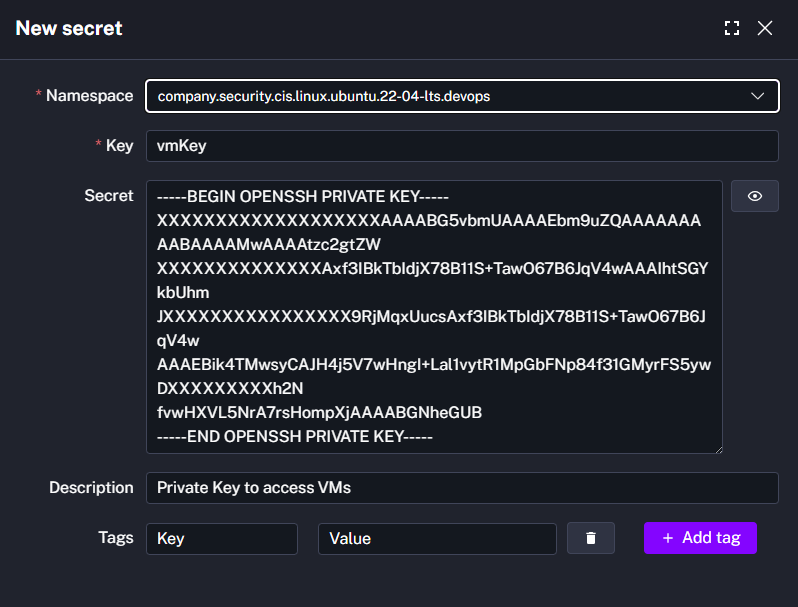
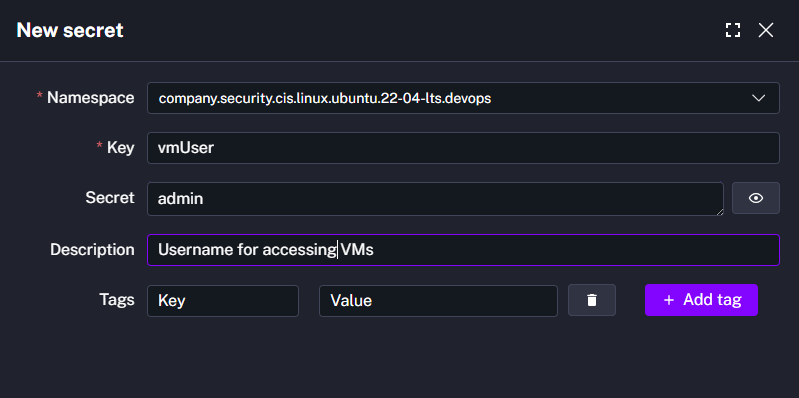
- Add secrets for the SSH username (
vmUser) and private key (vmKey) used to connect to the VM. - Store any additional secrets (for example, webhook secrets) you will reference in flows and triggers.
Step 4: Model the Parent Flow
Design a flow that evaluates each control, remediates if required, and proceeds to the next control. At a high level the logic looks like this:
Start → Execute Control 1.6.4 → Assess Compliance→ If compliant → Move to next control→ If not compliant → Remediate → Re-assess → Next control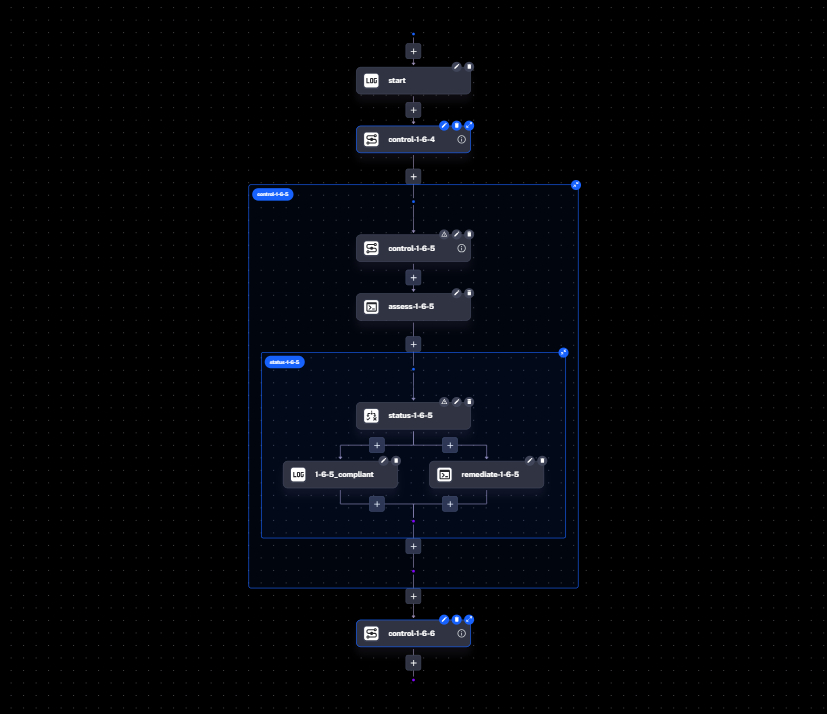
Step 5: Create Reusable Control Subflows
Create a subflow per control so you can reuse the same logic across namespaces. The example below implements control 1.6.5. Note how periods in the control number are converted to underscores for IDs (for example, 1_6_5).
id: control-1-1_6-1_6_5namespace: company.security.cis.linux.ubuntu.22-04-lts.devops
inputs:  - id: remediateControls    description: Toggle ON to auto-remediate non-compliant controls.    displayName: Auto Remediate    type: BOOL    defaults: true
  - id: ipAddress    type: STRING    defaults: localhost
variables:  COMPLIANT: Compliant  NOT_COMPLIANT: Not Compliant
tasks:  # Retrieve the recommended configuration from the KV store  - id: getConfiguration    type: io.kestra.plugin.core.kv.Get    key: "{{ render(flow.id) }}"
  # Assess the current VM state  - id: assess-1_6_5    type: io.kestra.plugin.fs.ssh.Command    host: "{{ inputs.ipAddress }}"    authMethod: PUBLIC_KEY    username: "{{ secret('vmUser') }}"    privateKey: "{{ secret('vmKey') }}"    commands:      - 'echo $(stat -Lc "Access: (%#a/%A)  Uid: ( %u/ %U) Gid: { %g/ %G)" /etc/issue) > output.log'      - echo '::{"outputs":{"result":"'$(cat output.log)'"}}::'
  - id: status-1_6_5    type: io.kestra.plugin.core.flow.If    condition: "{{ outputs['assess-1_6_5']['vars']['result'] == outputs.getConfiguration.value }}"    then:      - id: compliant-1_6_5        type: io.kestra.plugin.core.debug.Return        format: "{{ vars.COMPLIANT }}"    else:      - id: doRemediate        type: io.kestra.plugin.core.flow.If        condition: "{{ inputs.remediateControls == true }}"        then:          - id: remediate-1_6_5            type: io.kestra.plugin.fs.ssh.Command            host: "{{ inputs.ipAddress }}"            username: "{{ secret('vmUser') }}"            privateKey: "{{ secret('vmKey') }}"            authMethod: PUBLIC_KEY            commands:              - sudo chown root:root $(readlink -e /etc/issue)              - sudo chmod u-x,go-wx $(readlink -e /etc/issue)          - id: remediateResult-1_6_5            type: io.kestra.plugin.core.debug.Return            format: "{{ vars.COMPLIANT }}"        else:          - id: not-compliant-1_6_5            type: io.kestra.plugin.core.debug.Return            format: "{{ vars.NOT_COMPLIANT }}"
## Return output for the parent flowoutputs: - id: complianceStatus-1_6_5 type: STRING value: "{{ outputs['compliant-1_6_5']['value'] ?? outputs['remediateResult-1_6_5']['value'] ?? outputs['not-compliant-1_6_5']['value'] ?? 'Error' }}"Repeat the same pattern for controls 1.6.4 and 1.6.6.
Step 6: Assemble the Parent Flow
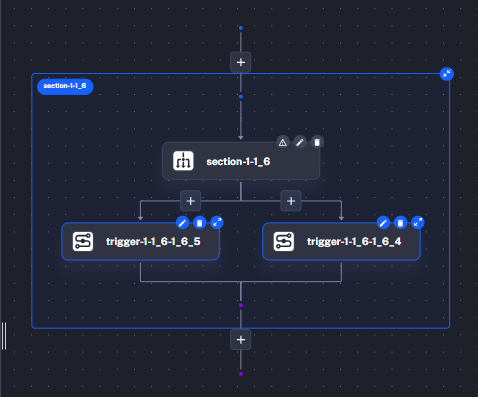
Use the subflows inside a parent orchestration that evaluates each control sequentially within a Parallel task (with concurrency set to 1). This lets you retrigger individual control branches without re-running the entire benchmark.
id: csrRevampednamespace: company.security.cis.linux.ubuntu.22-04-lts.devops
inputs:  - id: remediateControls    description: Toggle ON to auto-remediate non-compliant controls.    displayName: Auto Remediate    type: BOOL    defaults: true
  - id: ipAddress    displayName: IP Address    description: Host on which the scan must run.    type: STRING    defaults: localhost
tasks:  - id: section-1-1_6    type: io.kestra.plugin.core.flow.Parallel    # Tasks run in parallel but concurrency is limited to 1 so each control    # can be retriggered independently without re-running downstream steps.    concurrent: 1    tasks:      - id: trigger-1-1_6-1_6_4        type: io.kestra.plugin.core.flow.Sequential        tasks:          - id: control-1-1_6-1_6_4            type: io.kestra.plugin.core.flow.Subflow            namespace: "{{ flow.namespace }}"            flowId: control-1-1_6-1_6_4            inputs:              ipAddress: "{{ inputs.ipAddress }}"              remediateControls: "{{ inputs.remediateControls }}"            wait: true            transmitFailed: true
          - id: logStatus-1-1_6-1_6_4            type: io.kestra.plugin.core.log.Log            message: "{{ outputs['control-1-1_6-1_6_4'].outputs['complianceStatus-1_6_4'] }}"
      - id: trigger-1-1_6-1_6_5        type: io.kestra.plugin.core.flow.Sequential        tasks:          - id: control-1-1_6-1_6_5            type: io.kestra.plugin.core.flow.Subflow            namespace: "{{ flow.namespace }}"            flowId: control-1-1_6-1_6_5            inputs:              ipAddress: "{{ inputs.ipAddress }}"              remediateControls: "{{ inputs.remediateControls }}"            wait: true            transmitFailed: true
          - id: logStatus-1-1_6-1_6_5            type: io.kestra.plugin.core.log.Log            message: "{{ outputs['control-1-1_6-1_6_5'].outputs['complianceStatus-1_6_5'] }}"
## These triggers will be demonstrated in the VM creation and ServiceNow tutorialtriggers: - id: vmCreateFromServiceNow type: io.kestra.plugin.core.trigger.Webhook key: "{{ secret('webHookTriggerSecret') }}" - id: postVMCreation type: io.kestra.plugin.core.trigger.Flow inputs: ipAddress: "{{ trigger.outputs.createVMRevamped.externalIPAddress }}" dependsOn: - namespace: company.ops.it flowId: createVMRevamped states: [SUCCESS, WARNING]Step 7: Review the Topology
Each control runs in parallel but only one at a time because concurrent: 1. This makes it easy to rerun non-compliant controls individually without re-running the entire benchmark.
Demo
-
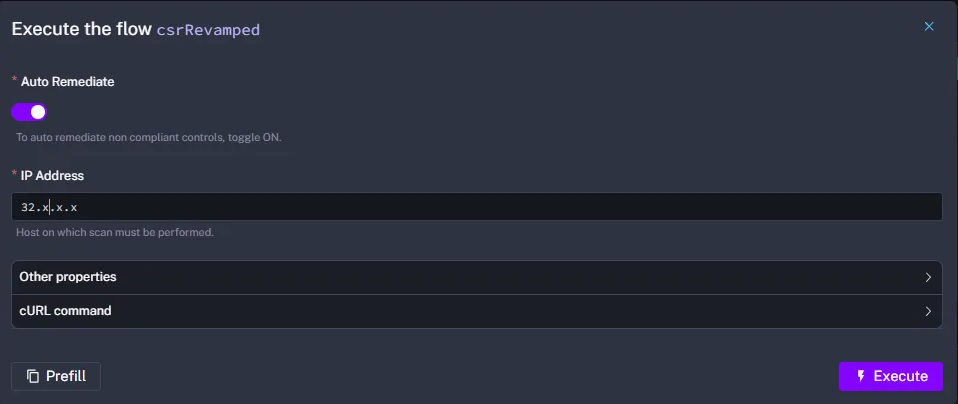
Execute the flow. Observe the initial compliance check.
-
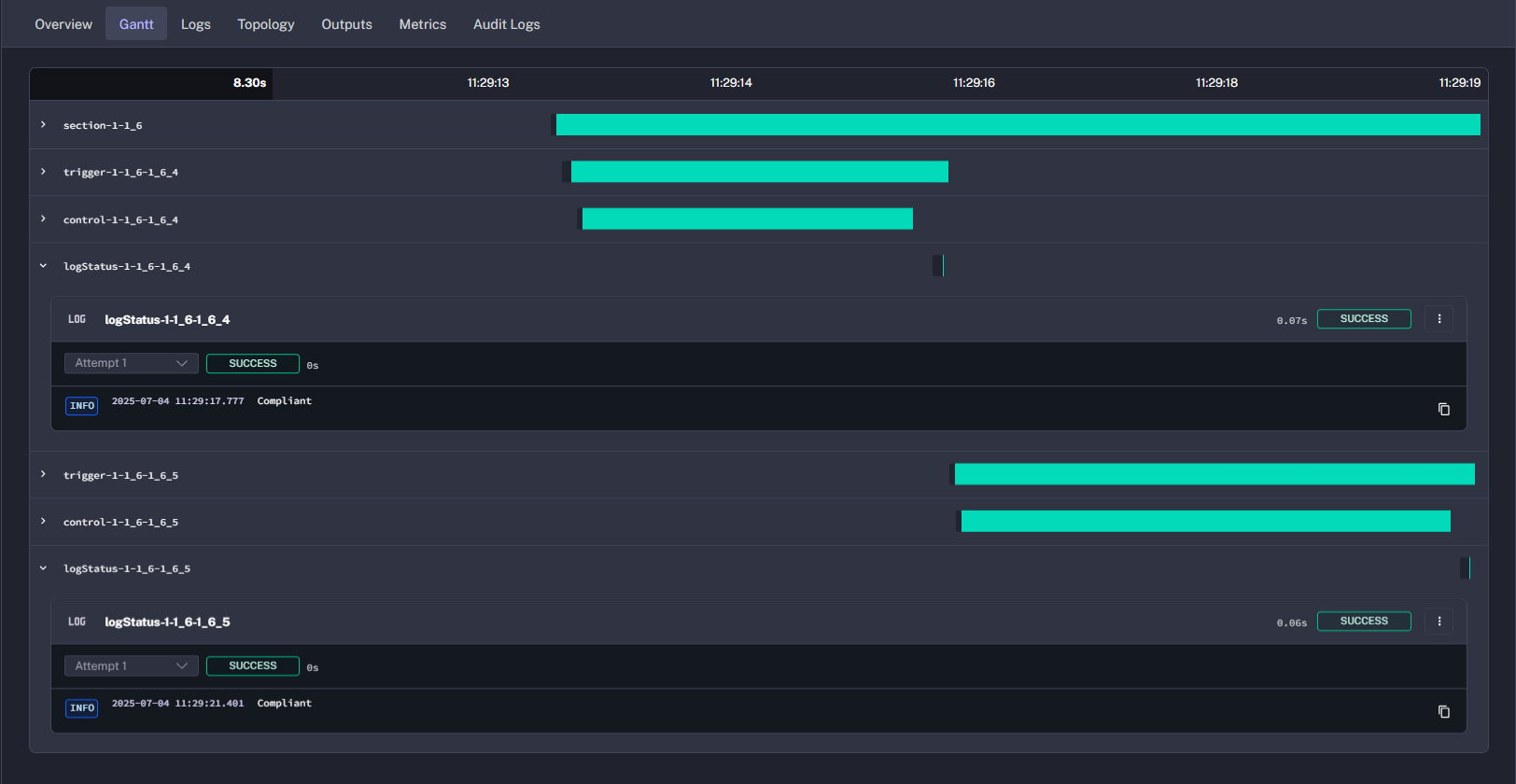
Check the results. Review the compliance summary.
-
Inspect the subflow. Confirm whether the VM was already compliant.
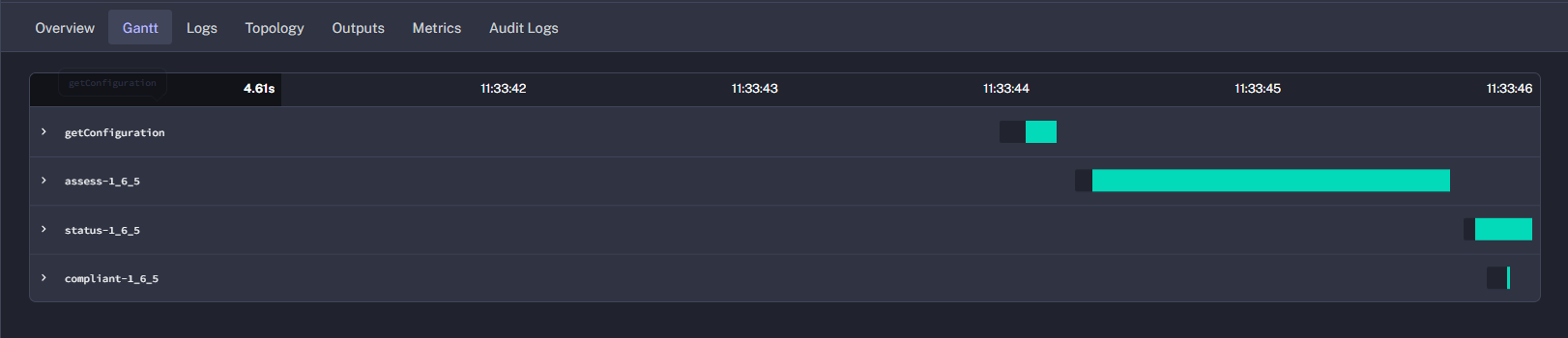
-
Force a drift. Change the VM setting for control
1_6_5(for example, from644to664).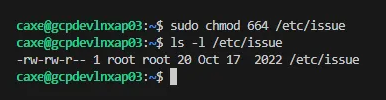
-
Retrigger only control
1_6_5.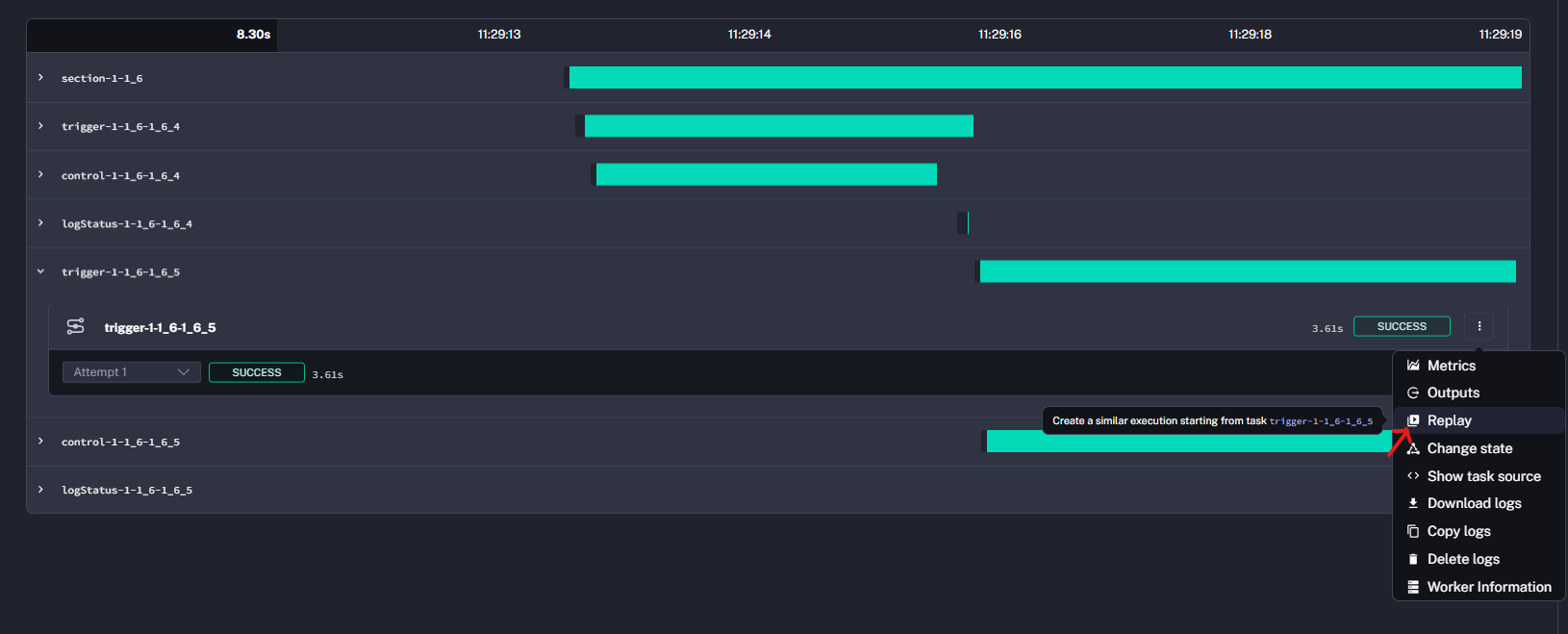
-
Review the logs. Verify that remediation executed for
1_6_5.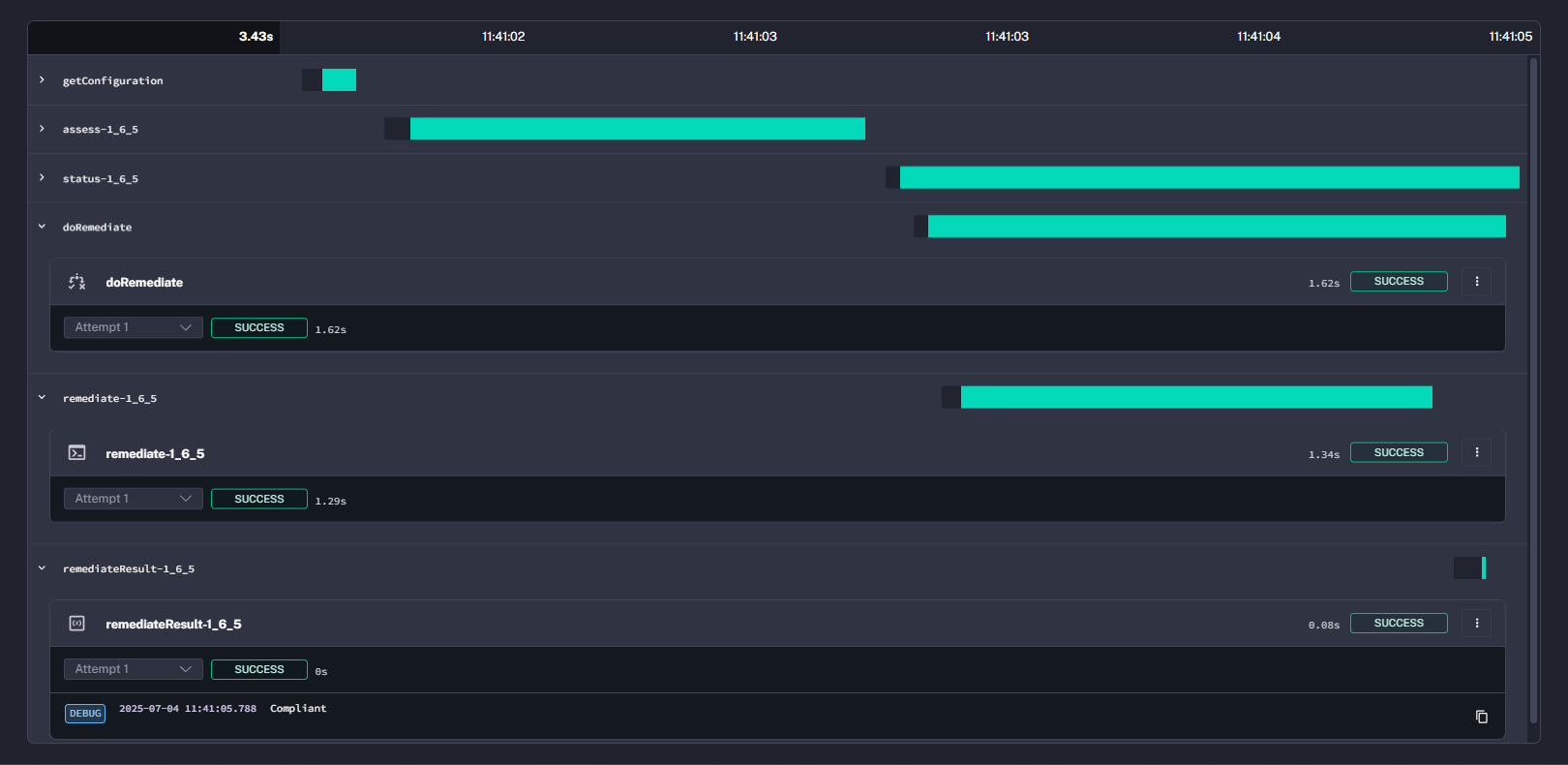
-
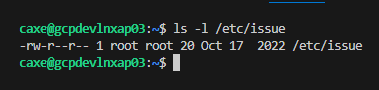
Validate the VM permissions. Confirm they returned to
644.
Result
You have enforced CIS benchmark controls through Kestra, combined compliance assessment with optional remediation, and validated that individual controls can be retriggered independently. Replace the placeholder images with real screenshots from your environment to complete the documentation.
Was this page helpful?