Call LLMs and Run AI Agents Inside Your Flows
For the complete documentation index, see llms.txt. For a full content snapshot, see llms-full.txt. Append.mdto anykestra.io/docs/*URL for plain Markdown.
Call a language model as a task in your flow, or give an AIAgent task a goal and the tools to reach it.
This page is for flow authors who want a model to do work during an execution. To get AI help writing flows, use AI Copilot or your own coding agent. To ground answers in your own documents, see RAG workflows.
Choose an LLM task or an AI agent
| LLM task | AI agent | |
|---|---|---|
| Who decides the steps | You, in the flow definition | The model, at runtime |
| Task type | ChatCompletion or a provider plugin | AIAgent |
| Typical jobs | Summarize, classify, or extract structured data, then hand the result to regular tasks | Open-ended goals that need tools: web search, calling flows, running code, delegating to other agents |
| Calls per run | Fixed | Varies with the tools the model decides to call |
Start with an LLM task when you can write the steps down. Use an agent when the model has to decide which tools to call and in what order.
Configure the model provider
Every AI plugin task takes a provider block with the provider type, the modelName, and the credentials. Store API keys as secrets and reference them with {{ secret('...') }}. To switch providers, change the provider block; the rest of the task stays the same.
Centralize provider configuration
To avoid repeating the provider block on every task, use a Policy with an Add rule to inject it into all AI tasks across a namespace. Policies are available in Enterprise Edition and Kestra Cloud.
Fall back to another provider
Use io.kestra.plugin.ai.provider.Fallback to try multiple chat providers in order. The task moves to the next provider on connection failures, timeouts, and retriable errors such as HTTP 5xx and 429 responses. Authentication failures, invalid requests, guardrail violations, tool execution errors, and response-processing failures stop the task without trying the next provider.
id: agent_with_fallbacknamespace: company.ai
inputs:  - id: prompt    type: STRING
tasks:  - id: agent    type: io.kestra.plugin.ai.agent.AIAgent    systemMessage: You are a helpful assistant. Answer clearly and concisely.    prompt: "{{ inputs.prompt }}"    provider:      type: io.kestra.plugin.ai.provider.Fallback      providers:        - type: io.kestra.plugin.ai.provider.OpenAI          modelName: gpt-5-mini          apiKey: "{{ secret('OPENAI_API_KEY') }}"        - type: io.kestra.plugin.ai.provider.GoogleGemini          modelName: gemini-2.5-flash          apiKey: "{{ secret('GEMINI_API_KEY') }}"
Set modelName on each nested provider. Connection properties such as baseUrl, clientPem, and caPem also belong on the nested provider, not on Fallback.
Each provider gets the full configured timeout. If all N providers time out, the task can run for up to N times the timeout before it fails. When every provider fails, the error message lists each provider and its failure type.
Kestra logs each attempt:
INFO Attempting chat request with provider OPEN_AI [model=gpt-5-mini] (1/2)WARN Skipping provider OPEN_AI [model=gpt-5-mini] after provider-side failure of type ConnectExceptionINFO Attempting chat request with provider GOOGLE_AI_GEMINI [model=gemini-2.5-flash] (2/2)Fallback supports chat tasks only. Using it with image generation or embedding tasks throws an error.
Call an LLM as a task
An LLM task calls the model once, at a fixed point in the flow, and passes the result to the next task. Use io.kestra.plugin.ai.completion.ChatCompletion to stay provider-agnostic. Provider plugins such as OpenAI, Gemini, and Ollama expose provider-specific features.
Turn a request into structured data
This flow asks the model to split a free-text request into to-do items, returns them as JSON that matches a schema, and creates one Todoist task per item. The schema uses Todoist’s field names, so each item is already a valid request body.
id: add_tasks_to_todoistnamespace: company.ai
inputs:  - id: request    type: STRING    displayName: What do you need to get done?    defaults: I need to pick up my prescription on Friday afternoon and go shopping afterwards
tasks:  - id: extract_tasks    type: io.kestra.plugin.ai.completion.ChatCompletion    provider:      type: io.kestra.plugin.ai.provider.GoogleGemini      modelName: gemini-3.5-flash-lite      apiKey: "{{ secret('GEMINI_API_KEY') }}"    configuration:      responseFormat:        type: JSON        jsonSchema:          type: object          required: ["tasks"]          properties:            tasks:              type: array              items:                type: object                required: ["content"]                properties:                  content:                    type: string                  description:                    type: string                  due_datetime:                    type: string                    description: Due date and time as an RFC 3339 timestamp    messages:      - type: SYSTEM        content: Split the user's request into separate to-do items. The current time is {{ now() }}.      - type: USER        content: "{{ inputs.request }}"
- id: create_tasks type: io.kestra.plugin.core.flow.Loop values: "{{ outputs.extract_tasks.jsonOutput.tasks }}" tasks: - id: create_task type: io.kestra.plugin.core.http.Request uri: https://api.todoist.com/api/v1/tasks method: POST contentType: application/json headers: Authorization: "Bearer {{ secret('TODOIST_API_TOKEN') }}" body: "{{ item.value }}"jsonOutput holds the parsed response, so the Loop task reads the tasks array directly and runs one HTTP request per item. Not every provider supports JSON schemas. For those that don’t, describe the expected JSON in the system message and parse textOutput instead.
Run a local model with Ollama
This flow summarizes the past week of commits in a GitHub repository with a model that runs on your own infrastructure, then posts the summary to Slack every Friday. OllamaCLI starts Ollama in a container, so the flow needs no model API key and the commit data stays on your worker.
id: summarize_weekly_commitsnamespace: company.ai
inputs:  - id: repository    type: STRING    defaults: kestra-io/blueprints    description: GitHub repository in owner/name form
tasks:  - id: fetch_commits    type: io.kestra.plugin.core.http.Request    uri: https://api.github.com/repos/{{ inputs.repository }}/commits?per_page=50&since={{ now() | dateAdd(-7, 'DAYS') | date("yyyy-MM-dd'T'00:00:00'Z'") }}
  - id: summarize_commits    type: io.kestra.plugin.ollama.cli.OllamaCLI    inputFiles:      commits.json: "{{ outputs.fetch_commits.body | jq('[.[].commit.message]') | first | toJson }}"    commands:      - ollama run --nowordwrap gemma3:1b "Summarize these Git commit messages as a short weekly update in plain text, without Markdown. $(cat commits.json)" > summary.txt    outputFiles:      - summary.txt
  - id: notify    type: io.kestra.plugin.slack.notifications.SlackIncomingWebhook    url: "{{ secret('SLACK_WEBHOOK') }}"    messageText: "Weekly update for {{ inputs.repository }}: {{ read(outputs.summarize_commits.outputFiles['summary.txt']) }}"
triggers: - id: every_friday type: io.kestra.plugin.core.trigger.Schedule cron: "0 15 * * 5"The first execution pulls the gemma3:1b model. OllamaCLI caches models in a Docker volume by default, so later executions reuse it. The --nowordwrap flag keeps terminal line-wrapping codes out of summary.txt.
Ollama writes its server output to stderr, which Kestra logs at ERROR level. Those red log lines are expected; check the task state to confirm the run succeeded.
Build an AI agent
An AIAgent task gives a model a goal and a set of tools, such as web search, running Kestra tasks, or calling other flows. The model decides which tools to call and in what order, and can keep calling them until it reaches the goal. Each run combines a system message, which defines the agent’s role and constraints, with a prompt, which carries the input for that execution. Add memory to keep context across executions.
Example: summarize text in any language
The following flow summarizes arbitrary text with controllable length and language. Each component of the flow is broken down below.
id: simple_summarizer_agentnamespace: company.aiinputs:  - id: summary_length    displayName: Summary Length    type: SELECT    defaults: medium    values:        - short        - medium        - long  - id: language    displayName: Language ISO code    type: SELECT    defaults: en    values:        - en        - fr        - de        - es        - it        - ru        - ja  - id: text    type: STRING    displayName: Text to summarize    defaults: |        Kestra is an open-source orchestration platform that:        - Allows you to define workflows declaratively in YAML        - Allows non-developers to automate tasks with a no-code interface        - Keeps everything versioned and governed, so it stays secure and auditable        - Extends easily for custom use cases through plugins and custom scripts.        Kestra follows a "start simple and grow as needed" philosophy. You can schedule a basic workflow in a few minutes, then later add Python scripts, Docker containers, or complicated branching logic if the situation calls for it.tasks:  - id: multilingual_agent    type: io.kestra.plugin.ai.agent.AIAgent    provider:      type: io.kestra.plugin.ai.provider.GoogleGemini      modelName: gemini-3.5-flash-lite      apiKey: "{{ secret('GEMINI_API_KEY') }}"    configuration:      logRequests: true      logResponses: true      responseFormat:        type: TEXT    systemMessage: |        You are a precise technical assistant.        Produce a {{ inputs.summary_length }} summary in {{ inputs.language }}.        Keep it factual, remove fluff, and avoid marketing language.        If the input is empty or non-text, return a one-sentence explanation.        Output format:        - 1-2 sentences for 'short'        - 2-5 sentences for 'medium'        - Up to 5 paragraphs for 'long'    prompt: |        Summarize the following content: {{ inputs.text }}
- id: english_brevity type: io.kestra.plugin.ai.agent.AIAgent provider: type: io.kestra.plugin.ai.provider.GoogleGemini modelName: gemini-3.5-flash-lite apiKey: "{{ secret('GEMINI_API_KEY') }}" configuration: logRequests: true logResponses: true responseFormat: type: TEXT prompt: Generate exactly 1 sentence English summary of "{{ outputs.multilingual_agent.textOutput }}"Inputs
The flow uses three inputs (summary_length, language, and text) to control the summary length, language, and source text.
All inputs have a default value. Any of them can be referenced in downstream tasks with expressions. When executing the flow, any input can be selected or modified from its default.
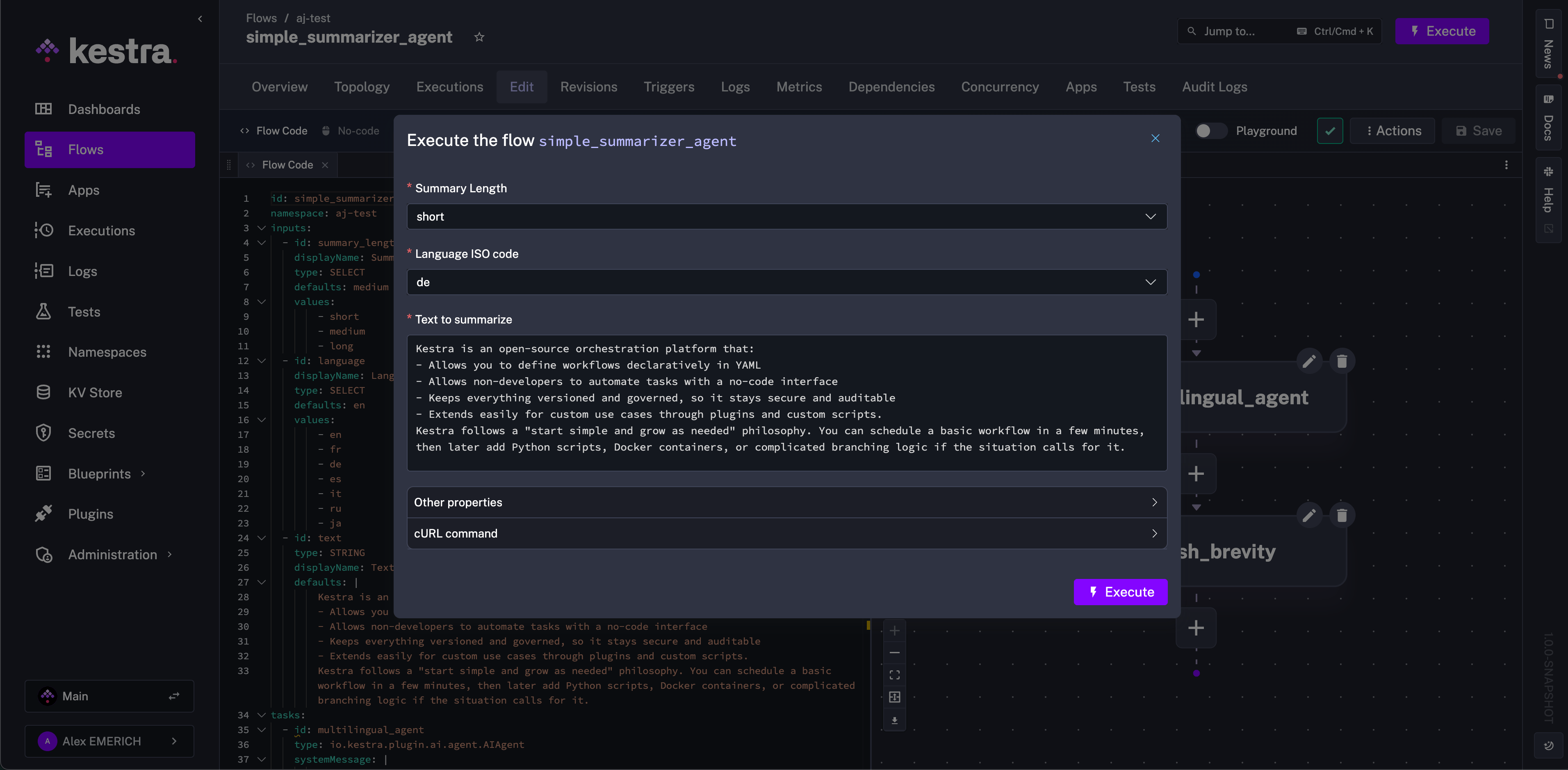
The example selects short for the summary length and German (de) for the summary language.
Tasks
The flow has two tasks using the AI Agent plugin: multilingual_agent and english_brevity. The first task, multilingual_agent, uses the systemMessage property to set the agent’s role and behavior. The system message references the input selections for summary length and language, and defines what to output for each length option.
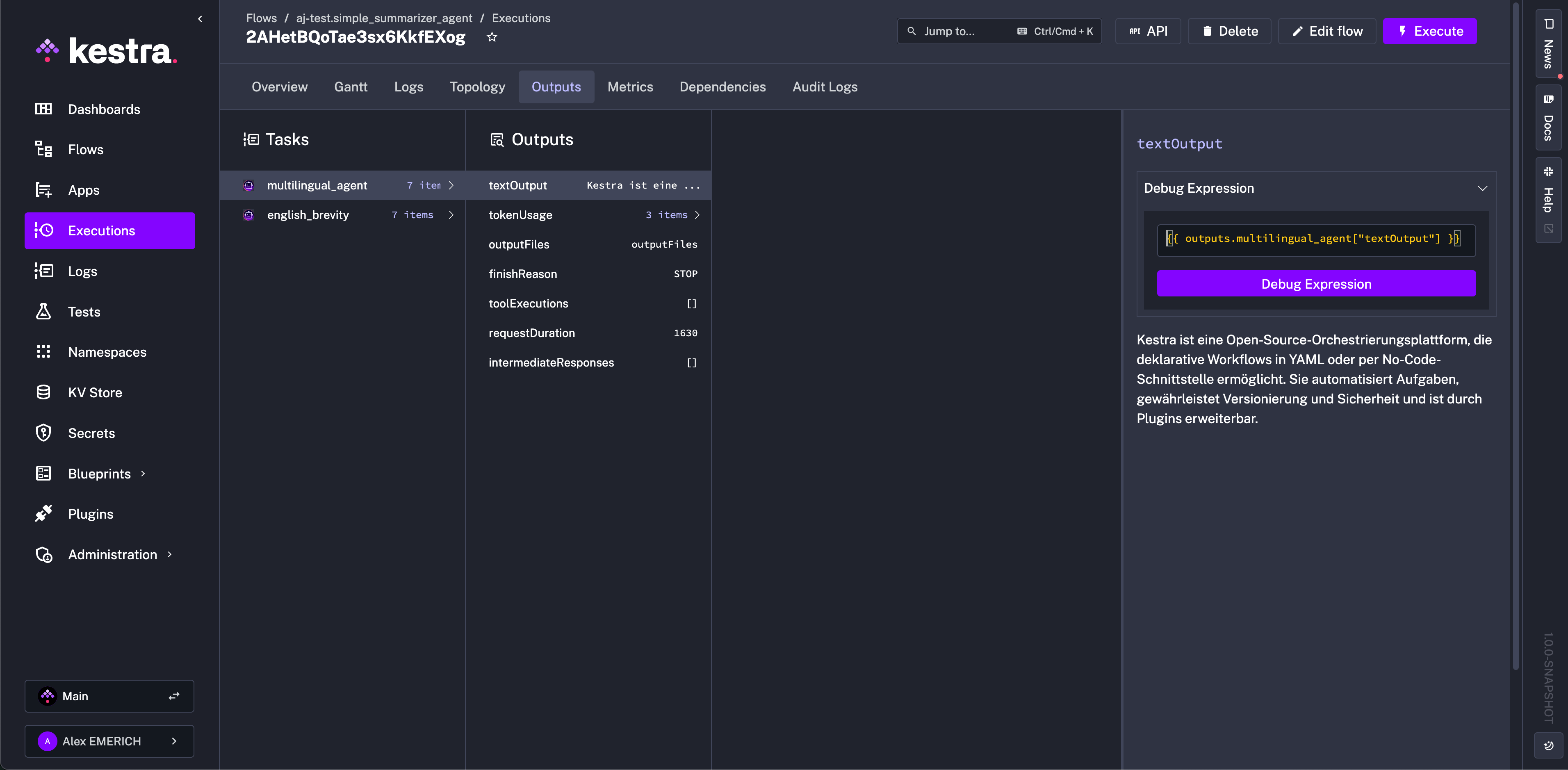
The prompt property instructs the agent to summarize the input text. For a short summary, multilingual_agent produces a 1–2 sentence German summary of Kestra.
The english_brevity task has no systemMessage, so the prompt alone instructs the model. It reads the first task’s textOutput and produces a one-sentence English summary, whatever the original language or length.
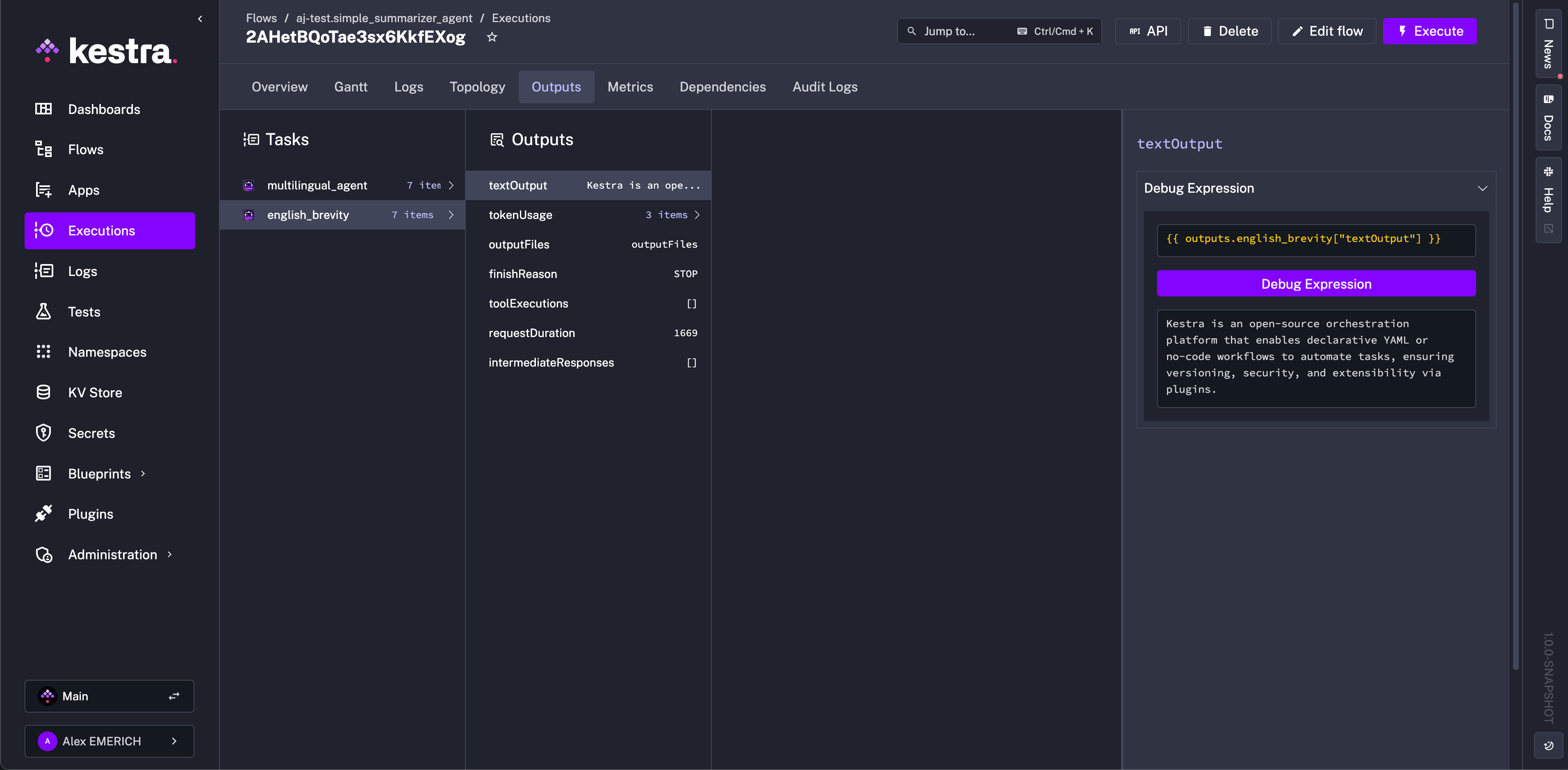
Pass these outputs to notification tasks, subflows, or other agents. Use the tokenUsage output to compare providers on the same task. Kestra also emits the counter metrics ai.agent.tool.calls, ai.provider.calls, and ai.embedding.store.calls, tagged by class name, which you can scrape with Prometheus or export through OpenTelemetry. For all properties and outputs, see the AI Agent plugin documentation.
Agent tools
The AI Agent can be extended with tools: capabilities the model can call at runtime to complete its task. Tools are listed under the tools property of an AIAgent task.
Skills
The Skill tool lets you attach structured instructions to an agent that it can activate on demand. Rather than including all instructions in the system message, skills let you define discrete, reusable knowledge blocks, each with a name, a description the LLM uses to decide when to activate it, and the actual instruction content.
This is useful when an agent has multiple possible modes of operation, such as translating text, reviewing code, or formatting data, where you want the LLM to select and apply the right instructions based on context rather than always receiving all instructions at once.
Each skill requires:
name: a unique identifier for the skilldescription: explains to the LLM when to activate the skillcontentorcontentUri: the instruction content, either inline or loaded from Kestra internal storage
Inline skill content
The simplest way to define a skill is with inline content:
id: agent_with_skillsnamespace: company.ai
tasks:  - id: agent    type: io.kestra.plugin.ai.agent.AIAgent    prompt: Translate the following text to French - "Hello, how are you today?"    provider:      type: io.kestra.plugin.ai.provider.GoogleGemini      modelName: gemini-3.5-flash-lite      apiKey: "{{ secret('GEMINI_API_KEY') }}"    tools:      - type: io.kestra.plugin.ai.tool.Skill        skills:          - name: translation_expert            description: Expert translator for multiple languages            content: |              You are an expert translator. When translating text:              1. Preserve the original meaning and tone              2. Use natural phrasing in the target language              3. Keep proper nouns unchanged
Loading skill content from storage
For longer or reusable instructions, store the skill content as a file in Kestra internal storage and reference it with contentUri. This is especially useful when skill content is generated or updated by an earlier task in the same flow:
id: agent_with_skill_from_storagenamespace: company.ai
tasks:  - id: write_instructions    type: io.kestra.plugin.core.storage.Write    content: |      You are a senior code reviewer. When reviewing code:      1. Check for security vulnerabilities      2. Ensure proper error handling      3. Verify naming conventions are followed      4. Flag any code duplication
- id: agent type: io.kestra.plugin.ai.agent.AIAgent prompt: "Review this Python function - 'def add(a, b): return a + b'" provider: type: io.kestra.plugin.ai.provider.GoogleGemini modelName: gemini-3.5-flash-lite apiKey: "{{ secret('GEMINI_API_KEY') }}" tools: - type: io.kestra.plugin.ai.tool.Skill skills: - name: code_review_expert description: Expert code reviewer with strict guidelines contentUri: "{{ outputs.write_instructions.uri }}"A single Skill tool can define multiple skills. Each skill must have a unique name. content and contentUri are mutually exclusive, and each skill needs exactly one of them. For more details on all available properties, refer to the Skill plugin documentation.
Kestra-native tools
- KestraFlow: Triggers a Kestra flow as a tool, either with a predefined namespace and flow ID or dynamically based on the agent’s prompt.
- KestraTask: Exposes one or more Kestra runnable tasks as tools, letting the agent supply values for properties left unset.
Web search
- TavilyWebSearch: Gives the agent access to live web results via the Tavily search API.
- GoogleCustomWebSearch: Gives the agent access to live web results via a Google Custom Search Engine.
Code execution
- CodeExecution: Lets the agent write and run JavaScript snippets in a Judge0 sandbox (via RapidAPI).
Nested agents
- AIAgent: Wraps another AI agent as a callable tool so a parent agent can delegate sub-tasks to a specialized child agent.
- A2AClient: Forwards prompts to a remote AI agent over the Agent-to-Agent (A2A) protocol and returns its response.
MCP clients
Kestra supports MCP in two directions. These clients cover the Kestra-as-client direction: your flow calls tools on an external MCP server. To go the other way and expose your flows as MCP tools for external AI agents, see flow MCP servers and the McpToolTrigger.
Connect the agent to any Model Context Protocol (MCP) server to expose its tools:
- DockerMcpClient: Runs an MCP server inside a Docker container.
- SseMcpClient: Connects to a remote MCP server over Server-Sent Events (SSE).
- StdioMcpClient: Spawns a local MCP server process and communicates over stdio.
- StreamableHttpMcpClient: Connects to an MCP server over HTTP streaming.
The Kestra Python MCP server is an example of an external MCP server you can connect to from a Kestra AI Agent task using one of the clients above.
Docker Agent
Docker Agent is a multi-agent framework where specialized agents, defined in a YAML configuration file, collaborate and delegate work. The io.kestra.plugin.docker.cli.Agent task runs a Docker Agent team from a Kestra flow, so you can schedule agent workloads, chain them after upstream tasks, and capture results as a ScriptOutput.
The task requires a Docker task runner and accepts model provider credentials through the inherited env property. Model strings use the provider/model-name format: openai/ with OPENAI_API_KEY for OpenAI, or google/ with GOOGLE_API_KEY for Google Gemini.
OpenAI:
id: docker_agent_openainamespace: company.ai
triggers:  - id: every_morning    type: io.kestra.plugin.core.trigger.Schedule    cron: "0 7 * * *"
tasks:  - id: daily_digest    type: io.kestra.plugin.docker.cli.Agent    taskRunner:      type: io.kestra.plugin.scripts.runner.docker.Docker      user: root    env:      OPENAI_API_KEY: "{{ secret('OPENAI_API_KEY') }}"    prompt: "Write a short digest of yesterday's failed deployments."    agentConfig: |      agents:        root:          model: openai/gpt-4o-mini          instruction: You write concise operations digests.
Google Gemini:
id: docker_agent_gemininamespace: company.ai
triggers:  - id: every_morning    type: io.kestra.plugin.core.trigger.Schedule    cron: "0 7 * * *"
tasks:  - id: daily_digest    type: io.kestra.plugin.docker.cli.Agent    taskRunner:      type: io.kestra.plugin.scripts.runner.docker.Docker      user: root    env:      GOOGLE_API_KEY: "{{ secret('GOOGLE_API_KEY') }}"    prompt: "Write a short digest of yesterday's failed deployments."    agentConfig: |      agents:        root:          model: google/gemini-3.5-flash-lite          instruction: You write concise operations digests.
The agentConfig property accepts inline YAML (as above), a relative path to an existing file in the working directory, or a kestra:// internal storage URI. When using a relative path, the file must exist in the working directory before the Agent task starts. Stage it with a WorkingDirectory task and an earlier write or download step.
Docker Agent prints a startup banner to stderr. Kestra captures stderr as ERROR-level log entries, so those lines appear red in the execution logs even when the task succeeds. The agent’s actual output appears at INFO level.
For all properties and outputs, see the Docker Agent plugin reference.
Execution details
When you open an execution in the topology view, the details panel for AIAgent, ChatCompletion, and rag.ChatCompletion tasks shows the LLM configuration and post-execution context for each call.
Pre-execution:
- Model name and provider
- System prompt (collapsible)
- Tools available to the agent
- RAG retriever and embedding store configuration (when applicable)
Post-execution:
| Signal | Description |
|---|---|
| LLM response | The final text or JSON output rendered inline |
| Tool call timeline | Each tool invocation in order: name, arguments, and result |
| Token usage | Input tokens, output tokens, total, and an estimated cost by provider and model |
| Reasoning chain | Intermediate responses and extended thinking steps when present |
| RAG sources | Retrieved chunks ranked by similarity score, showing which context grounded the answer |
| Finish reason | Why the model stopped: natural stop, max tokens reached, or a guardrail trigger |
Was this page helpful?