Configure Encryption, Secret Backends & Auth Security
For the complete documentation index, see llms.txt. For a full content snapshot, see llms-full.txt. Append.mdto anykestra.io/docs/*URL for plain Markdown.
Use this page when you need to protect sensitive values or harden a Kestra deployment.
Encryption
This is the minimum security configuration most self-managed instances should think about early, because it determines whether sensitive flow values can be stored safely at rest.
Kestra supports encryption of sensitive inputs and outputs at rest through kestra.encryption.secret-key.
Example:
kestra: encryption: secret-key: BASE64_ENCODED_STRING_OF_32_CHARACTERSGenerate a key with:
openssl rand -base64 32Without kestra.encryption.secret-key, SECRET inputs and outputs fail at runtime because Kestra cannot encrypt the value at rest.
Example flow using SECRET types:
id: my_secret_flownamespace: company.team
inputs:  - id: secret    type: SECRET
tasks:  - id: mytask    type: io.kestra.plugin.core.log.Log    message: task that needs the secret to connect to an external system
outputs:  - id: secret_output    type: SECRET    value: "{{ inputs.secret }}"
Secret backends
Choose the backend based on where your organization already stores secrets. In practice, most teams want Kestra to consume an existing cloud or Vault-based secret system rather than create a separate one just for workflows.
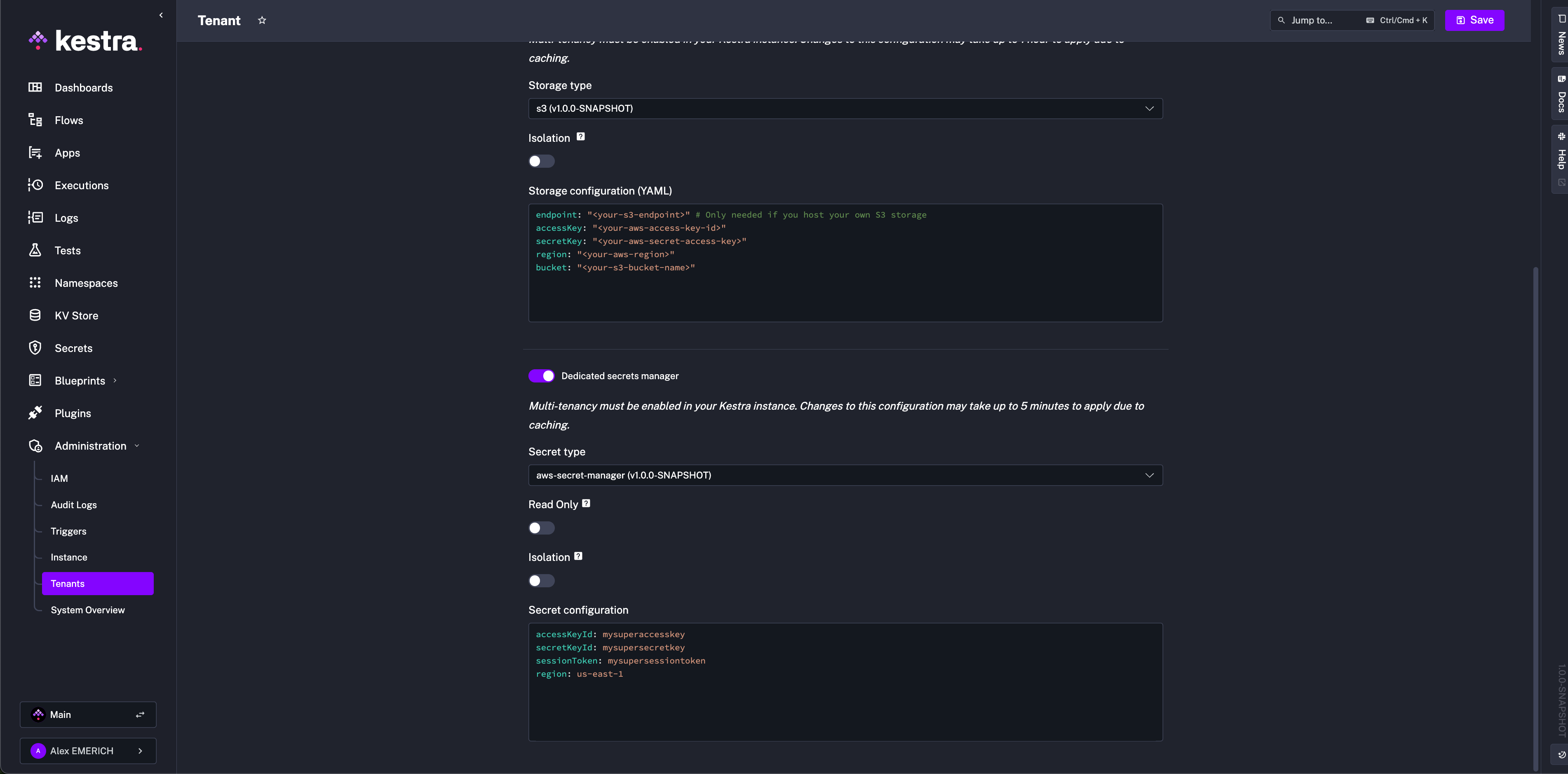
Kestra can be configured to use a secrets backend through kestra.secret.*.
For the full backend reference — including all supported backends, complete property tables, permissions, credential resolution order, and read-only mode — see Secrets Manager.
Base structure:
kestra: secret: type: azure-key-vault azure-key-vault: client-secret: tenant-id: "id" client-id: "id" client-secret: "secret" isolation: enabled: true denied-services: - EXECUTORisolation is the key control to understand here: it limits which Kestra services are allowed to resolve secrets, which is useful when you want workers or executors to have narrower access than the whole platform.
The Azure service principal referenced in the base structure above must have the following Key Vault access policy permissions: Get, List, Set, Delete, Recover, Backup, Restore, Purge.
Representative backend examples:
AWS Secrets Manager requires the following IAM permissions: CreateSecret, DeleteSecret, DescribeSecret, GetSecretValue, ListSecrets, PutSecretValue, RestoreSecret, TagResource, UpdateSecret.
kestra: secret: type: aws-secret-manager aws-secret-manager: access-key-id: mysuperaccesskey secret-key-id: mysupersecret-key session-token: mysupersessiontoken region: us-east-1Google Secret Manager requires the roles/secretmanager.admin role. Omit service-account to fall back to GOOGLE_APPLICATION_CREDENTIALS or the environment’s default credentials:
kestra: secret: type: google-secret-manager google-secret-manager: project: gcp-project-id service-account: | <service-account JSON>Elasticsearch secrets are additionally encrypted with AES. The key must be at least 32 characters:
kestra: secret: type: elasticsearch elasticsearch: secret: "a-secure-32-character-minimum-key"HashiCorp Vault (KV v2) supports Userpass, Token, and AppRole authentication.
Userpass:
kestra: secret: type: vault vault: address: "http://localhost:8200" password: user: john password: fooToken:
kestra: secret: type: vault vault: address: "http://localhost:8200" token: token: your-secret-tokenAppRole:
kestra: secret: type: vault vault: address: "http://localhost:8200" app-role: path: approle role-id: your-role-id secret-id: your-secret-idJDBC-backed secrets, secret tags, and secret caching are covered below.
JDBC secret backend
Use JDBC-backed secrets only when secrets must stay inside the same database boundary as Kestra and you do not already have a dedicated secret manager:
kestra: secret: type: jdbc jdbc: secret: "your-secret-key"Secret tags
Some backends let you scope lookups with tags so the same secret manager can serve multiple environments:
kestra: secret: <secret-type>: tags: application: kestra-productionTags are useful when secrets are selected by metadata rather than by one fixed path convention.
Secret cache
Caching reduces repeated secret-manager calls for frequently used values:
kestra: secret: cache: enabled: true maximum-size: 1000 expire-after-write: 60sUse a cache when executions hit the same secret names repeatedly, but keep TTLs conservative if secret rotation happens often.
Security settings
This section is about hardening the running platform rather than managing secret values. Reach for it when you are locking down access, controlling invitations and roles, or tuning how the server reacts to component health issues.
This group includes:
- instance owner behavior
- default roles
- invitation expiration
- password rules
- server basic auth
- deletion of configuration files
Server and endpoint hardening examples:
kestra: server: basic-auth: username: admin@kestra.io password: change-me open-urls: - "/api/v1/main/executions/webhook/"endpoints: all: basic-auth: username: your-user password: your-passwordInstance Owner
The instance owner account has the highest level of platform access and should be reserved for break-glass administration:
kestra: security: instance-owner: username: your_username password: ${KESTRA_INSTANCE_OWNER_PASSWORD} tenant-admin-access: - <optional>kestra.security.super-admin is a deprecated alias for kestra.security.instance-owner and still works.
Never store clear-text passwords in config. Use environment variables or your platform secret mechanism.
Default role
Assign a default role to newly created users when you want them to land with a predictable permission set:
kestra: security: default-role: name: default description: "Default role" permissions: FLOW: ["VIEW", "LIST", "CREATE", "UPDATE", "DELETE", "EXECUTE"]In multi-tenant environments, scope that role to one tenant:
kestra: security: default-role: name: default description: "Default role" permissions: FLOW: ["VIEW", "LIST", "CREATE", "UPDATE", "DELETE", "EXECUTE"] tenant-id: stagingPlace default-role under kestra.security, not micronaut.security.
Invitation expiration and password rules
Invitation links expire after seven days by default. Extend them if user onboarding happens through slower approval processes:
kestra: security: invitations: expire-after: P30DFor username/password auth, configure password complexity explicitly:
kestra: security: basic-auth: password-min-length: 8 password-require-special: true password-min-digits: 1 password-min-lower-case: 1 password-min-upper-case: 1 password-allowed-special-characters: "!@#$%^&*"These rules apply anywhere Kestra asks a user to set or reset a password, including the initial setup flow, invitation acceptance, and user management screens.
Delete configuration files after startup
If the runtime reads secrets from configuration files, delete them after startup so tasks cannot read them later from disk:
kestra: configurations: delete-files-on-start: trueLiveness and heartbeat settings also belong here. The parameter constraints below affect cluster stability:
timeout— must match across all Executorsinitial-delay— must match across all Executorsheartbeat-interval— must be strictly less thantimeout
Recommended settings for JDBC-backed (OSS) deployments:
kestra: server: liveness: enabled: true interval: 5s timeout: 45s initial-delay: 45s heartbeat-interval: 3sRecommended settings for Kafka-based (EE) deployments:
kestra: server: liveness: timeout: 1m initial-delay: 1mWorker liveness in Kafka mode is handled by Kafka’s protocol guarantees, so you only need to set timeout and initial-delay for the EE stack.
Heartbeat and restart behavior also belong here:
kestra.heartbeat.frequencycontrols how often workers emit heartbeats. Default:10s.kestra.heartbeat.heartbeat-missedcontrols how many missed heartbeats mark a worker as dead. Default:3.kestra.server.worker-task-restart-strategyacceptsNEVER,IMMEDIATELY, orAFTER_TERMINATION_GRACE_PERIODand determines what happens to running worker tasks during shutdown.
Set the termination grace period long enough for tasks to exit cleanly:
kestra: server: termination-grace-period: 5mIf the deployment regularly creates empty server instances, adjust how often purge runs:
kestra: server: service: purge: retention: 7dKeep the external process manager timeout longer than Kestra’s own termination grace period. Otherwise Kubernetes, Docker, or systemd can kill the process before graceful shutdown finishes.
Regex timeout
Kestra protects worker threads from ReDoS (catastrophic backtracking) by enforcing a timeout on all regex operations. This applies to Pebble expression filters (regexMatch, regexReplace, regexExtract, replace with regexp=true) and to validator patterns on STRING and SECRET inputs. When a pattern exceeds the limit, the task fails immediately with a timeout error rather than hanging indefinitely.
The default timeout is 10 seconds. To change it, set kestra.regex.timeout in your configuration:
kestra: regex: timeout: 30sAccepts ISO 8601 duration strings (e.g., PT30S, PT1M) or Micronaut shorthand (e.g., 5s, 1m).
The timeout is set once at startup and cannot be changed at runtime without restarting the server.
Passwordless OTP
Enable passwordless One-Time-Password login so users authenticate via an emailed code instead of a password. Requires a mail service to be configured.
kestra: security: one-time-password: enabled: true expiration: PT5M code-length: 6 rate-limit: max-requests: 10 window: PT1HSee Passwordless (OTP) for setup prerequisites and full property details.
Related docs
- Secrets manager concepts: External Secrets Manager
- Enterprise auth and RBAC: Authentication and Users
- EE platform settings and advanced backends: Enterprise and Advanced
Was this page helpful?