Validate Inputs Before Any Task Runs with Checks
For the complete documentation index, see llms.txt. For a full content snapshot, see llms-full.txt. Append.mdto anykestra.io/docs/*URL for plain Markdown.
Checks are flow-level assertions evaluated against inputs before an execution is created. Each check defines a boolean when expression and a message to display when the expression evaluates to false.
Properties
| Property | Required | Default | Description |
|---|---|---|---|
when | Yes | — | Pebble expression that must evaluate to a boolean. Can reference inputs, KV pairs, and other expression variables. |
message | Yes | — | Text displayed in the Execute modal when the condition is false. |
style | No | INFO | Visual style for the message: ERROR, SUCCESS, WARNING, or INFO. |
behavior | No | BLOCK_EXECUTION | How the flow reacts when the condition is false: BLOCK_EXECUTION (do not create), FAIL_EXECUTION (create in failed state), or CREATE_EXECUTION (create anyway). |
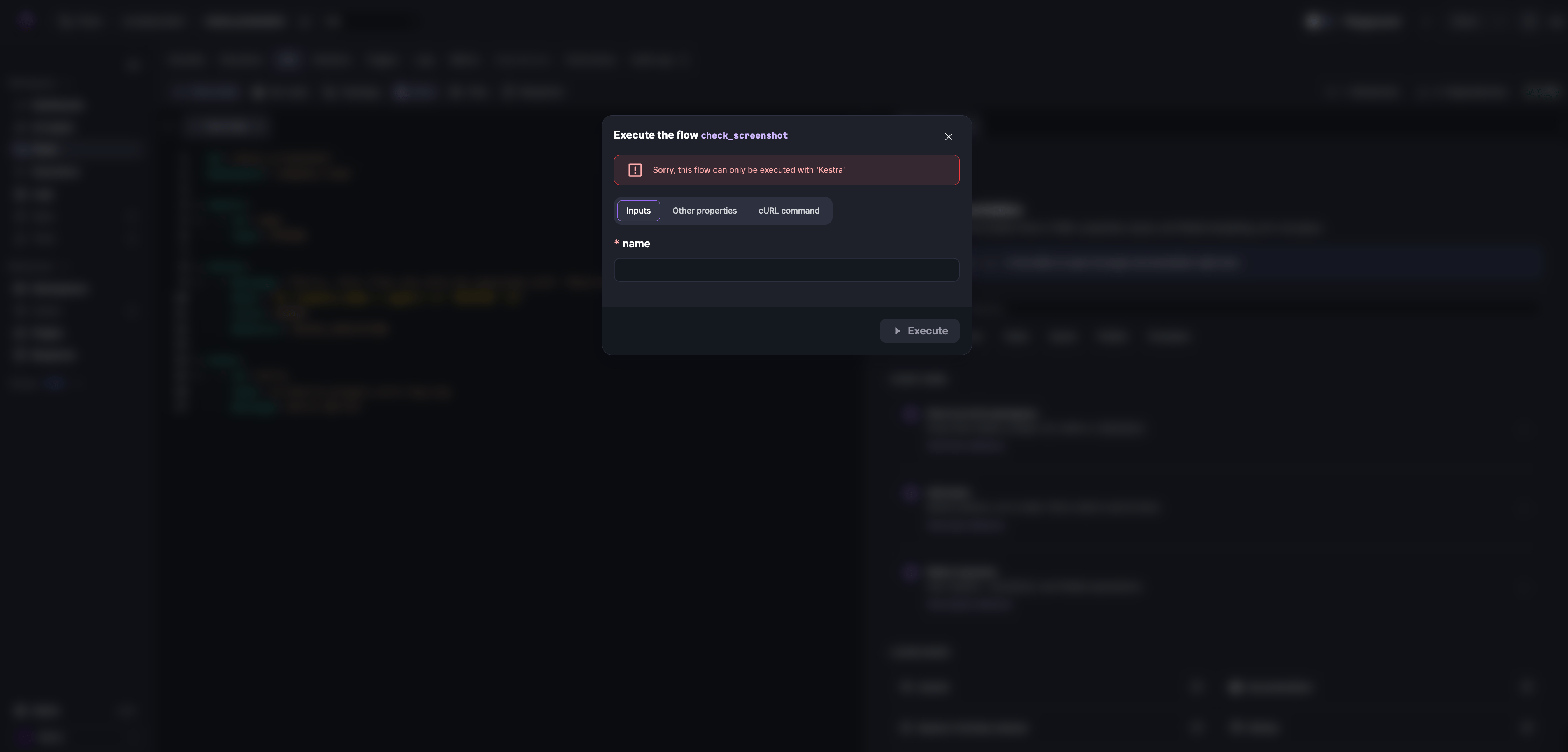
When you click Execute, the modal displays the message as soon as an input fails a check:
Multiple checks
If several checks fail, the most restrictive behavior wins in this priority order: BLOCK_EXECUTION → FAIL_EXECUTION → CREATE_EXECUTION. This lets you mix hard stops with softer warnings in the same flow.
Evaluation behavior
The following rules govern when expression evaluation:
- The condition must evaluate to a boolean
true. Only a real boolean passes; not the string"true","yes", a number, or any other truthy value. Use comparisons and boolean operators (e.g.{{ inputs.age >= 18 }}) rather than returning a string. - An unevaluatable condition always blocks. If the condition cannot be evaluated (for example, an undefined variable or a syntax error), the check fails safe: the execution is hard-blocked with
BLOCK_EXECUTIONand anERRORstyle, regardless of thebehaviorandstyleyou declared. Fix the expression and reference only variables that exist at validation time to restore your declared behavior.
Examples
Simple guard
This flow blocks execution unless the name input is Kestra.
id: simple_checknamespace: company.team
inputs:  - id: name    type: STRING
checks:  - message: "Sorry, this flow can only be executed with 'Kestra'"    when: "{{ (inputs.name | upper) == 'KESTRA' }}"    style: ERROR    behavior: BLOCK_EXECUTION
tasks:  - id: hello    type: io.kestra.plugin.core.log.Log    message: Hello World! 🚀
Advanced guarded ingest
This flow pulls sample data from DummyJSON, blocks prod runs outside a time window, and warns (but allows) when using a non-approved source URL.
id: guarded_ingestnamespace: company.team
inputs:  - id: environment    type: SELECT    values: [dev, prod]    defaults: dev  - id: run_date    type: DATETIME    defaults: "{{ now() }}"  - id: payload_url    type: URI    defaults: https://dummyjson.com/products?limit=5
checks:  # Block risky prod runs outside the allowed window  - message: "Prod runs are only allowed between 06:00 and 22:00 UTC"    when: "{{ inputs.environment != 'prod' or (inputs.run_date | date('HH') | number >= 6 and inputs.run_date | date('HH') | number < 22) }}"    style: ERROR    behavior: BLOCK_EXECUTION
  # Warn if the payload is not the approved source  - message: "Non-approved source detected. Use https://dummyjson.com when possible."    when: "{{ inputs.payload_url | startsWith('https://dummyjson.com') }}"    style: WARNING    behavior: CREATE_EXECUTION
tasks:  - id: fetch    type: io.kestra.plugin.core.http.Download    uri: "{{ inputs.payload_url }}"
- id: log_run type: io.kestra.plugin.core.log.Log message: "Run {{ execution.id }} in {{ inputs.environment }} with file {{ outputs.fetch.uri }}"Was this page helpful?