Populate Input Dropdowns Dynamically from APIs or Databases
For the complete documentation index, see llms.txt. For a full content snapshot, see llms-full.txt. Append.mdto anykestra.io/docs/*URL for plain Markdown.
Support dynamic dropdown for inputs based on data from external source.
In this guide, we show how you can create a dynamic dropdown list for inputs. The dropdown retrieves the values from an external source. It is possible to do so by storing the values in the KV store, and also to directly integrate the external source with the HTTP Pebble function, http().
Update KV store on schedule
To get started, we create a flow that fetches the data from the external source and set the value in the KV store. The value will be in the form of a list of strings.
In this example, the flow fetches data from a PostgreSQL table on an hourly schedule. You can change the cron property to run at a different frequency depending on how frequently you expect the data at the source to change. If the external source is in a database that supports change data capture, as in this case where we use PostgreSQL table, you can also use the debezium trigger and immediately update the KV store.
id: update_kv_storenamespace: company.team
tasks:  - id: fetch_departments    type: io.kestra.plugin.jdbc.postgresql.Query    url: "jdbc:postgresql://{{ secret('POSTGRES_HOST') }}:5432/postgres"    username: "{{ secret('POSTGRES_USERNAME') }}"    password: "{{ secret('POSTGRES_PASSWORD') }}"    sql: select department_name from departments    fetchType: FETCH
  - id: department_key    type: io.kestra.plugin.core.kv.Set    key: "{{ task.id }}"    kvType: JSON    value: "{{ outputs.fetch_departments.rows | jq('.[].department_name') }}"
triggers:  - id: schedule    type: io.kestra.plugin.core.trigger.Schedule    cron: "0 */1 * * *"
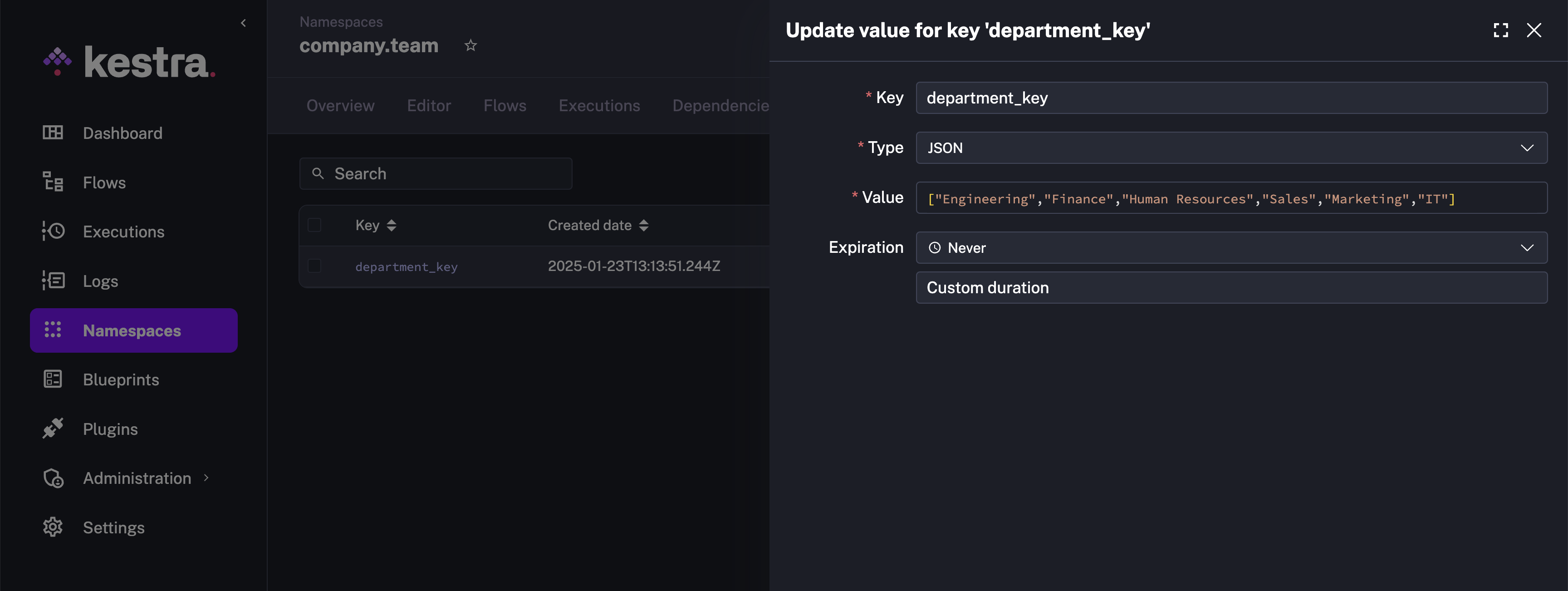
This is how the KV store will look post execution of the above flow.
Flow supporting Dynamic Inputs
Let us now create the flow that supports dynamic dropdown for inputs powered by the KV store key.
id: dynamic_input_flownamespace: company.team
inputs:  - id: department    displayName: Department Name    type: SELECT    expression: "{{ kv('department_key') }}"
tasks:  - id: hello    type: io.kestra.plugin.core.log.Log    message: "The selected department is {{ inputs.department }}"
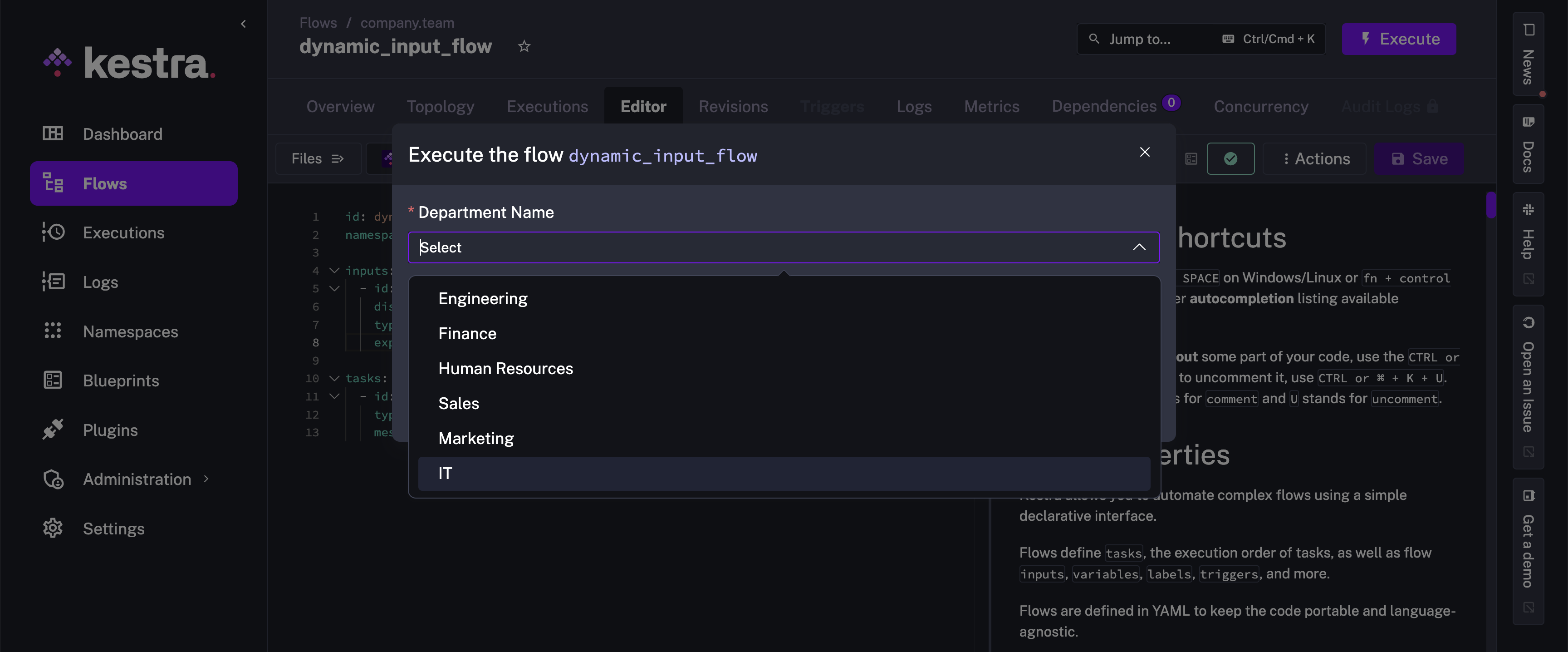
When you execute this flow, the department input will have a dropdown that contains the values fetched from the department_key key in the KV store.
Dynamic Inputs with HTTP function
With the http() function, you can make SELECT and MULTISELECT inputs dynamic by fetching options from an external API. This proves valuable when your data used in dropdowns changes frequently or when you already have an API serving that data for existing applications.
The example below demonstrates how to create a flow with two dynamic dropdowns: one for selecting a product category and another for selecting a product from that category. The first dropdown fetches the product categories from an external HTTP API. The second dropdown makes another HTTP call to dynamically retrieve products matching the selected category.
id: dynamic_dropdownsnamespace: company.teaminputs: - id: category type: SELECT expression: "{{ http(uri = 'https://dummyjson.com/products/categories') | jq('.[].slug') }}" - id: product type: SELECT dependsOn: inputs: - category expression: "{{ http(uri = 'https://dummyjson.com/products/category/' + inputs.category) | jq('.products[].title') }}"tasks: - id: display_selection type: io.kestra.plugin.core.log.Log message: | You selected Category: {{ inputs.category }} And Product: {{ inputs.product }}Dynamic inputs are useful for flows using authenticated API requests like the following:
id: approversFlownamespace: company.team
inputs:  - id: executionIdsToBeApproved    type: MULTISELECT    expression: >-      {{      http(        uri = 'http://localhost:8080/api/v1/internal/executions/search?state=PAUSED',        method = 'GET',        contentType = 'application/json',        headers={          'User-Agent': 'kestra',          'Connection': 'keep-alive',          'Authorization': 'Bearer ' ~ secret("bearerToken")        }      ) | jq('.results[] | "ExecutionId: \(.id), FlowId: \(.flowId), RequestedBy: \(.labels[] | select(.key == "system.username").value) InputParams: \( .inputs | to_entries | map("\(.key):\(.value)") | join(" ") )"')  }}
tasks:  - id: hello    type: io.kestra.plugin.core.log.Log    message: Hello World! 🚀
When using http() inside an expression with secrets in headers (e.g., an authenticated API request), use named arguments and string concatenation (Pebble Literals). The key to the syntax is to use string interpolation with ~.
Populate a dropdown from a subflow
When kv() and http() are not enough — for example, when you need to run a script task, call a CLI command (aws ec2 describe-instances, gcloud projects list), or execute complex multi-step logic — use the subflow() Pebble function.
subflow() runs a subflow synchronously at form render time and exposes its flow-level outputs as the dropdown values. The main flow does not start until the subflow finishes and the form is submitted.
Step 1 — Create the data-fetching subflow. This flow queries your infrastructure and returns a list as a flow-level output:
id: fetch_aws_regionsnamespace: company.ops
tasks:  - id: get_regions    type: io.kestra.plugin.scripts.shell.Commands    taskRunner:      type: io.kestra.plugin.core.runner.Process    commands:      - |        regions=$(aws ec2 describe-regions --query 'Regions[].RegionName' --output json)        echo "::$(printf '{"outputs":{"regions":%s}}' "$regions")::"
outputs:  - id: regions    type: JSON    value: "{{ outputs.get_regions.vars.regions }}"
The ::{"outputs":{"key":"value"}}:: line is Kestra’s script output format — it’s how shell.Commands tasks publish named values that downstream expressions can reference via outputs.<task_id>.vars.<key>.
Step 2 — Reference it from a SELECT input in your main flow:
id: deploy_to_regionnamespace: company.ops
inputs:  - id: region    type: SELECT    displayName: AWS Region    expression: "{{ subflow(namespace='company.ops', id='fetch_aws_regions').outputs.regions }}"
tasks:  - id: deploy    type: io.kestra.plugin.core.log.Log    message: "Deploying to {{ inputs.region }}"
When a user opens the Execute form, Kestra runs fetch_aws_regions synchronously and populates the dropdown from its output.
Chaining dropdowns with dependsOn
You can chain dropdowns so the second list depends on the first selection:
inputs:  - id: environment    type: SELECT    expression: "{{ subflow(namespace='company.ops', id='fetch_environments').outputs.envs }}"
  - id: cluster    type: SELECT    dependsOn:      inputs:        - environment    expression: "{{ subflow(namespace='company.ops', id='fetch_clusters', inputs={'env': inputs.environment}).outputs.clusters }}"
Constraints to be aware of:
subflow()is only valid in theexpression:property of aSELECTorMULTISELECTinput. It throws if used in a task or trigger property.- The subflow must complete within the timeout (default
PT1M, maxPT5M). Keep data-fetching subflows fast. - Recursion is capped at depth 3.
- Each subflow referenced in a
SELECTorMULTISELECTexpression appears in the parent flow’s Dependencies graph automatically.
Conditional inputs
Use dependsOn and condition to show an input only when a previous input matches a value. The following flow shows different inputs depending on which resource type the user selects:
id: request_resourcesnamespace: company.team
inputs:  - id: resource_type    displayName: Resource type    type: SELECT    values:      - Access permissions      - SaaS application      - Cloud VM
  - id: access_permissions    displayName: Access permissions    type: SELECT    expression: "{{ kv('access_permissions') }}"    dependsOn:      inputs:        - resource_type      condition: "{{ inputs.resource_type == 'Access permissions' }}"
  - id: saas_applications    displayName: SaaS application    type: MULTISELECT    expression: "{{ kv('saas_applications') }}"    dependsOn:      inputs:        - resource_type      condition: "{{ inputs.resource_type == 'SaaS application' }}"
  - id: cloud_provider    displayName: Cloud provider    type: SELECT    values:      - AWS      - GCP      - Azure    dependsOn:      inputs:        - resource_type      condition: "{{ inputs.resource_type == 'Cloud VM' }}"
  - id: cloud_vm    displayName: Cloud VM    type: SELECT    expression: "{{ kv('cloud_vms')[inputs.cloud_provider] }}"    dependsOn:      inputs:        - resource_type        - cloud_provider      condition: "{{ inputs.resource_type == 'Cloud VM' }}"
tasks: - id: log type: io.kestra.plugin.core.log.Log message: "Resource type: {{ inputs.resource_type }}"dependsOn.inputs lists the inputs that must be provided first. dependsOn.condition is a Pebble expression that controls visibility — the dependent input only appears in the Execute modal when the condition is true. An input can depend on multiple parents; all listed inputs must be provided before the condition is evaluated.
Populate the KV store keys before running the flow:
Flow to add key-value pairs
id: add_kv_pairsnamespace: company.team
tasks:  - id: access_permissions    type: io.kestra.plugin.core.kv.Set    key: "{{ task.id }}"    kvType: JSON    value: |      ["Admin", "Developer", "Editor", "Launcher", "Viewer"]
  - id: saas_applications    type: io.kestra.plugin.core.kv.Set    key: "{{ task.id }}"    kvType: JSON    value: |      ["Slack", "Notion", "HubSpot", "GitHub", "Jira"]
- id: cloud_vms type: io.kestra.plugin.core.kv.Set key: "{{ task.id }}" kvType: JSON value: | { "AWS": ["t2.micro", "t2.small", "t2.medium", "t2.large"], "GCP": ["f1-micro", "g1-small", "n1-standard-1", "n1-standard-2"], "Azure": ["Standard_B1s", "Standard_B1ms", "Standard_B2s", "Standard_B2ms"] }dependsOn inside FORM inputs
To make one child input inside a FORM depend on another, use the full dotted path in dependsOn.inputs:
inputs:  - id: cloud    type: FORM    displayName: Cloud configuration    inputs:      - id: provider        type: SELECT        values: [AWS, GCP, Azure]
      - id: region        type: SELECT        dependsOn:          inputs:            - cloud.provider          condition: "{{ inputs.cloud.provider == 'AWS' }}"        values:          - us-east-1          - eu-west-1
Label/value pairs for decoupled dropdowns
When your API returns structured data, use a {label, value} jq projection so the dropdown shows a human-readable label while {{ inputs.x }} resolves to the underlying technical identifier:
id: dynamic_account_selectornamespace: company.team
inputs:  - id: aws_account    type: SELECT    displayName: AWS Account    expression: "{{ http(uri = 'https://api.example.com/accounts') | jq('.accounts[] | {label: .name, value: .id}') }}"
tasks:  - id: log_account    type: io.kestra.plugin.core.log.Log    message: "Selected account ID: {{ inputs.aws_account }}"
The dropdown displays account names; {{ inputs.aws_account }} resolves to the account ID. The same pattern works with static values lists — see Label/value pairs in SELECT and MULTISELECT inputs.
Was this page helpful?